Running a business website is fundamentally different from running a personal blog. Downtime costs money. Slow checkouts cost sales. A database error during a peak period costs customers. The hosting decisions that matter most for a business aren’t about price per month alone — they’re about what happens when things go wrong, how fast the site recovers, and whether the infrastructure keeps pace with growth. This review looks at Hostinger Cloud Professional hosting specifically through the lens of business use — what it costs, what it protects, and whether it’s genuinely the right managed cloud choice for a business website at this price point.
Why Business Websites Need More Than Shared Hosting
Most businesses start on shared hosting. The entry price is low, the setup is simple, and for the first few months it usually works fine. The problems emerge as the business grows:
- Checkout pages slow down during sales events because shared CPU is being consumed by neighbouring accounts
- Contact forms and booking systems timeout because PHP workers are exhausted by concurrent visitors
- Email newsletters trigger spam flags because the shared IP has a mixed reputation across hundreds of accounts
- A plugin update corrupts the database and the last backup was six days ago
Every one of these issues has a direct cost to a business. Cloud Professional hosting is specifically architected to eliminate them — dedicated resources, daily backups, a dedicated IP, and fully managed infrastructure that handles the server-side work while you focus on the business.
Hostinger Cloud Professional: Pricing for Business Websites
| Billing Term | Price Per Month | Total Upfront | Best For |
|---|---|---|---|
| 48 months | $15.99/mo | ~$767.52 | Established businesses committing long-term |
| 24 months | ~$18.99/mo | ~$455.76 | Growing businesses with 2-year horizon |
| 12 months | ~$21.99–$24.99/mo | ~$263–$299 | Businesses evaluating cloud hosting |
Hostinger runs seasonal promotions that can reduce these rates further. Always check the current live price for Cloud Professional before checkout to see if an active discount applies.
Compared to dedicated managed WordPress hosts like WP Engine or Kinsta, which charge $25–$50/month for entry-level plans with fewer resources, Cloud Professional at $15.99/month on the long-term rate represents genuinely competitive pricing for fully managed cloud infrastructure.
Full Business-Grade Specifications of Cloud Professional
Dedicated Performance Resources
- 4 dedicated CPU cores — not shared with any other business or account on the same infrastructure
- 6 GB dedicated RAM — 50% more than Cloud Startup, supporting larger databases, more concurrent users, and memory-intensive business applications
- 200 GB NVMe SSD storage — high-speed storage for large product catalogs, CRM data, media libraries, and business application files
- Unlimited bandwidth — no penalties for traffic spikes from ad campaigns, email sends, or seasonal demand
- Advanced WooCommerce support for catalogs up to 1,000 products
- Full resource isolation — your business site’s performance is never affected by other accounts
Business Security and Data Protection
- Dedicated IP address — keeping your email deliverability and business reputation separate from shared infrastructure
- Unlimited free SSL certificates, automatically installed and renewed — essential for customer trust and Google search ranking
- Daily automatic backups plus on-demand backup capability — so you can create a manual snapshot before any major update
- DDoS protection at the network level
- Malware scanner and vulnerability monitoring
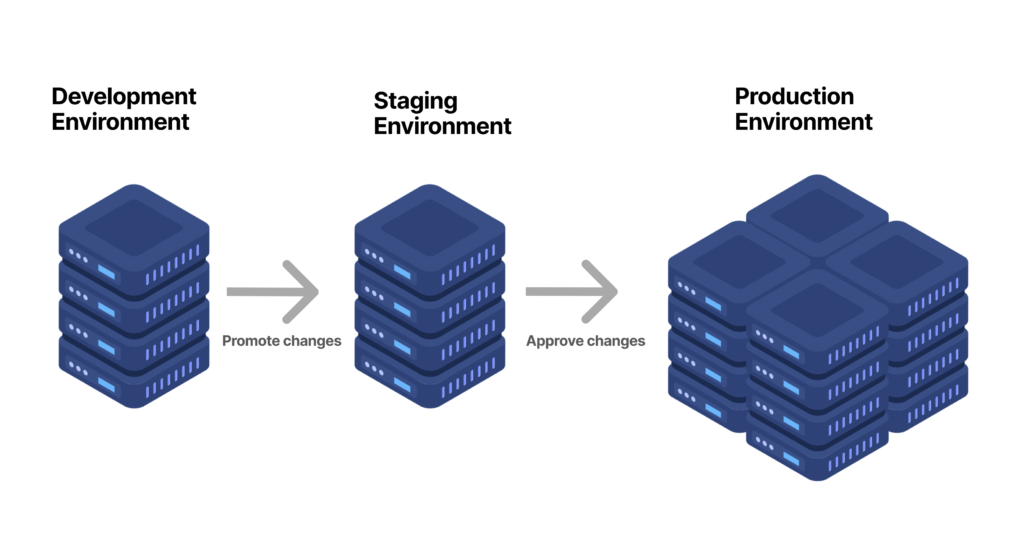
- WordPress staging environment — test every plugin update, site redesign, or WooCommerce change on a copy of your live site before it touches customers
Business Operations Tools
- Free domain name for the first year (a $9.99 value)
- Free email mailboxes for the first year — professional yourname@yourbusiness.com addresses for your team
- Free CDN built into hPanel — reducing load times for customers regardless of their geographic location
- Object Cache — reducing repeated database queries, directly speeding up product pages and checkout flows
- Priority 24/7 expert support — faster queue handling than standard support tiers
- 99.9% uptime guarantee
- 30-day money-back guarantee
For a business that depends on its website for lead generation, sales, or bookings, that combination of dedicated resources, daily backups with on-demand snapshots, Hostinger Cloud Professional hosting, and a staging environment on Hostinger Cloud Professional addresses the operational risks specific to running a revenue-generating site.
Cloud Professional vs Other Managed Cloud Hosts for Business
| Feature | Hostinger Cloud Professional | WP Engine Startup | Kinsta Starter | SiteGround Cloud Jump Start |
|---|---|---|---|---|
| Starting Price | $15.99/mo (48-mo term) | ~$25–$30/mo | ~$25–$35/mo | $100/mo |
| RAM | 6 GB (dedicated) | Not disclosed | Not disclosed | 8 GB (dedicated) |
| Storage | 200 GB NVMe | 10–50 GB | 10 GB SSD | 40 GB SSD |
| Free Domain | Yes (1 year) | No | No | No |
| Dedicated IP | Included | Add-on | Add-on | Available |
| Staging Environment | Included | Included | Included | Included |
| WordPress-Only | No (flexible) | Yes | Yes | No |
Competitor pricing reflects standard published rates at time of writing. WP Engine and Kinsta don’t publicly disclose exact RAM figures for their managed environments.
At $15.99/month, Hostinger Cloud Professional offers 6 GB dedicated RAM and 200 GB NVMe storage at a price point well below most comparable managed cloud alternatives. The flexibility to host non-WordPress applications is a practical advantage for businesses running custom tools, CRMs, or booking systems alongside their main site.
3 Business Scenarios Where Cloud Professional Makes the Most Sense
Scenario 1 — The Growing eCommerce Business
Your WooCommerce store has grown to several hundred products with daily order volume. You’ve experienced slowdowns during sales campaigns, Hostinger Cloud Professional hosting, and your current hosting’s weekly backup schedule means a bad plugin update could cost you days of order history. Cloud Professional’s 6 GB RAM, daily backups with on-demand snapshots, Object Cache, and dedicated IP for clean email delivery address each of these pain points directly.
Scenario 2 — The Service Business With High Lead Volume
Your site books appointments, processes contact forms, and drives real customer enquiries daily. Downtime or form errors have a direct cost. Cloud Professional’s dedicated resources, daily backups, 99.9% uptime guarantee, and priority support give you the infrastructure reliability a lead-generation site depends on.
Scenario 3 — The Agency Managing Multiple Business Clients
You’re managing several active client sites, each needing reliable performance, regular plugin updates tested safely, and protected customer data. Cloud Professional’s staging environment, on-demand backups, and support for large numbers of websites under one managed account makes it a practical consolidated platform for agency operations.
Pros and Cons of Cloud Professional for Business Use
Pros
- 6 GB dedicated RAM — more than adequate for most business applications and WooCommerce catalogs under 1,000 products
- On-demand backup capability alongside daily automatic backups
- Staging environment included — eliminates the risk of breaking a live business site during updates
- Dedicated IP protects business email deliverability from shared-IP reputation issues
- Significantly cheaper than WP Engine, Kinsta, or SiteGround Cloud for comparable managed infrastructure
- Flexible — not WordPress-only, supports custom business applications
- 30-day money-back guarantee
Cons
- No phone support — support is chat and ticket-based, though priority queuing applies
- Renewal pricing increases after the first promotional term — budget for this upfront
- Businesses with very high simultaneous concurrency may need Cloud Enterprise sooner
- Longest-term commitment (48 months) required for the lowest monthly rate
How to Migrate Your Business Website to Cloud Professional
- Open Hostinger’s Cloud Professional plan page and select your billing term
- Request Hostinger’s free, no-downtime migration service if moving from another host — your business site stays live throughout the move
- Set up your staging environment immediately after migration for future safe testing
- Enable Object Cache and the built-in CDN with one click in hPanel
- Configure your on-demand backup schedule before making any changes to the live site
- Set up your professional business email mailboxes under your domain
Frequently Asked Questions
Is Hostinger Cloud Professional good for a business website?
Yes, particularly for businesses with active WooCommerce stores, booking systems, or lead-generation sites where downtime and data loss have direct revenue consequences. The dedicated resources, daily backups, staging environment, and dedicated IP address directly address the operational risks business sites face.
How does Cloud Professional compare to Cloud Startup for business use?
Cloud Professional adds 2 GB more dedicated RAM (6 GB vs 4 GB), doubles the NVMe storage (200 GB vs 100 GB), and adds on-demand backup capability. For a business site with a large database, high concurrent user volume, or a WooCommerce catalog approaching 1,000 products, those upgrades are meaningful.
Does Cloud Professional include a staging environment?
Yes. A WordPress staging environment is included, letting you test plugin updates, theme changes, and site modifications on a copy of your live site before pushing changes to production.
Is migration from another host free?
Yes. Hostinger provides free, no-downtime website migration for Cloud Professional customers, so your business site stays accessible while the move happens.
Does Cloud Professional include a dedicated IP address?
Yes, included as standard. This is particularly valuable for businesses that send transactional emails or marketing newsletters, since it keeps your email reputation separate from any shared infrastructure.
Final Verdict: Is Cloud Professional the Best Managed Cloud Host for Business Websites?
For business websites that need the reliability, security, and performance of managed cloud hosting without the $25–$100/month price tags of WP Engine, Kinsta, or SiteGround Cloud, Hostinger Cloud Professional makes a compelling case. Six GB of dedicated RAM, 200 GB NVMe storage, daily backups with on-demand snapshots, a staging environment, and a dedicated IP — all managed through hPanel without requiring server administration expertise — at a starting price of $15.99/month.
For a business that’s outgrown shared hosting and needs infrastructure it can genuinely rely on, this is the upgrade that removes the risk without overcomplicating the stack. Check Hostinger’s current Cloud Professional pricing here and see whether it fits your business’s current hosting needs.
You can also read: Hostinger Cloud Startup Hosting for WooCommerce Stores: Features, Performance and Benefits.