Backups are the most important hosting feature almost nobody thinks about until they need one. The moment a plugin update corrupts a database, a bad deployment breaks a live site, or a security incident compromises files, the backup policy becomes the most consequential decision you made when choosing a host. Hostinger Business hosting includes free daily automatic backups as a standard plan feature — no add-on, no extra billing. This post explains exactly how that backup system works, what it protects against, and why the difference between daily and weekly backups matters more than most website owners realise until it’s too late.
How Hostinger’s Daily Backup System Works
Understanding what you’re getting requires understanding the mechanics of Hostinger’s backup system on the Business plan:
What Gets Backed Up
- All website files: Your WordPress core installation, theme files, plugin files, uploaded media, and any custom code
- Database: Your entire MySQL/MariaDB database — posts, pages, comments, WooCommerce orders, customer records, settings, and user accounts
- Email data: Mailbox content for your hosted email accounts
- Configuration files: .htaccess, wp-config.php, and server-side configuration
Backup Schedule and Storage
- Backups run automatically once every 24 hours
- Multiple restore points are maintained — you’re not limited to a single previous state
- Backups are stored independently from your hosting account — a problem with your hosting environment doesn’t affect backup availability
- The backup system runs server-side — your site doesn’t need to be actively serving traffic for backups to complete
How to Restore From a Backup
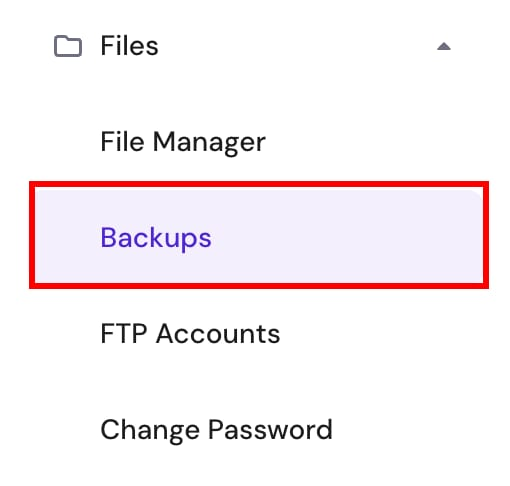
Restoration is handled through hPanel — Hostinger’s control panel — without requiring technical knowledge:
- Log into hPanel and navigate to the Backups section
- Select the restore point you want to recover from
- Choose whether to restore files, database, or both
- Confirm the restoration — the process completes automatically
No command-line access, no database import/export knowledge, no FTP file management required. The entire restoration process is available to non-technical website owners from the same dashboard they use for every other hosting task.
The Real Difference Between Daily and Weekly Backups
This comparison matters more than it might initially seem. Hostinger’s Premium plan includes weekly automatic backups. Business includes daily. Here’s what that difference means in practice:
| Scenario | Weekly Backup (Premium) | Daily Backup (Business) |
|---|---|---|
| Plugin update corrupts database on day 6 | Lose up to 6 days of content and data | Lose maximum 23 hours of data |
| WooCommerce orders during gap period | Up to 6 days of orders unrecoverable | Maximum 1 day of orders unrecoverable |
| New blog posts published in gap | Up to 6 articles need rewriting | Maximum 1 article needs rewriting |
| Contact form submissions in gap | Up to 6 days of leads permanently lost | Maximum 1 day of leads recoverable |
| User registrations in gap | Multiple user accounts disappear | Maximum 24 hours of registrations affected |
The worst-case data loss window is the critical metric. On Premium’s weekly schedule, every website owner is perpetually operating with a worst-case 6-day unprotected window. On Business hosting’s daily schedule, that window shrinks to under 24 hours — a meaningful operational difference for any site that generates new data every day.
The 5 Scenarios Where Daily Backups Actively Protect Your Website
Scenario 1: Plugin or Theme Update Gone Wrong
Plugin updates are the leading cause of WordPress site breakage. A WooCommerce update that introduces a compatibility conflict with your payment gateway, a theme update that breaks your layout, or a security plugin update that conflicts with a caching configuration can all produce a broken, inaccessible website in seconds. With daily backups, the recovery is straightforward: restore to yesterday’s backup, the site is live again, and the problematic update is rolled back. Without a recent backup, the recovery process involves manual debugging that can take hours — or days if the corruption is extensive.
Scenario 2: Accidental Content Deletion
A product category accidentally deleted in WooCommerce. A page removed that had significant SEO ranking. A custom post type cleared during a database cleanup. These mistakes happen — and without a recent backup, they require manual reconstruction from memory or cached versions. Daily backups on Hostinger Business hosting make the recovery a one-click restoration to yesterday’s state rather than a hours-long rebuilding exercise.
Scenario 3: Security Breach or Malware Injection

When a site is compromised — malware injected into theme files, a backdoor installed via a vulnerable plugin, or a database injection attack — the first priority is restoring a clean version of the site. A daily backup from before the compromise provides a verified clean restore point. Without one, you’re cleaning malware file by file with no certainty you’ve removed everything. The backup doesn’t prevent the security incident, but it dramatically reduces the recovery time and risk of missed malware remnants.
Scenario 4: Hosting Migration Error
Moving a site between domains, restructuring URLs, or migrating database content are complex operations where errors are common. If a database migration script goes wrong, or a find-and-replace operation corrupts URL structures across thousands of posts, a daily backup provides an exact restore point from before the migration began. The alternative — manually reversing a failed database operation — is often impossible without a backup.
Scenario 5: WordPress Core Update Complications
WordPress major version updates occasionally introduce changes that break specific plugin or theme functionality. On a site without a recent backup, a major WordPress update that breaks checkout functionality on a WooCommerce store can cost hours of revenue during the debugging and repair process. A daily backup makes the immediate response simple: restore to pre-update, maintain the live store, and test the update on a staging environment before reapplying.
Daily Backups vs Manual Backup Plugins: What’s the Difference?
Some website owners use free backup plugins like UpdraftPlus on entry-level hosting to compensate for infrequent automated backups. Here’s how that compares to Business hosting’s server-side daily backups:
| Feature | Manual Backup Plugin (Free) | Hostinger Business Daily Backups |
|---|---|---|
| Backup location | Same server (risk if server fails) or cloud storage setup required | Independent server — separate from hosting environment |
| Server resource usage | Consumes your hosting account’s CPU and RAM during backup | Server-side — no impact on site performance |
| Configuration required | Plugin installation, schedule setup, destination configuration | Automatic — no configuration needed |
| Maintenance | Plugin must be kept updated; destination authentication may expire | Fully maintained by Hostinger |
| Restoration process | Manual file download and database import | One-click restoration from hPanel |
| Cost | Free plugin + storage costs (Google Drive, Dropbox) | Included in Business plan price |
Server-side backups stored independently are more reliable than plugin-based backups stored on the same server — if the server itself has a hardware issue, backups stored on the same infrastructure may be affected along with the site. Hostinger’s server-side backup system addresses this by storing backups independently from your hosting account.
What Business Hosting Costs — and What the Backups Are Worth
The price difference between Hostinger Premium (weekly backups) and Business (daily backups) is approximately $18/year at the 12-month term:
- Premium: ~$36/year (12-month term)
- Business: ~$54/year (12-month term)
- Difference: $18/year — $1.50/month
What does $1.50/month of daily backup protection buy? Consider the alternatives: professional data recovery services for a corrupted WordPress database range from $150–$500+ depending on complexity. A developer billing hourly to manually reconstruct lost WooCommerce orders, leads, or content typically charges $50–$150/hour. Even a single recovery incident costs multiples of what the entire annual price difference between Premium and Business represents. Hostinger Business hosting at $54/year is the cheapest comprehensive data protection available for a WordPress site at this price tier.
Pros and Cons
Pros of Daily Backups on Business Hosting
- Maximum 24-hour data loss window — the minimum responsible protection for any active website
- Server-side storage independent from your hosting environment
- One-click hPanel restoration — no technical knowledge required
- No configuration, maintenance, or plugin installation needed
- Included at no additional cost — not a paid add-on
- Covers files, database, email, and configuration in one backup
Cons
- No on-demand backup capability on Business plan — that requires Cloud Professional or Enterprise tier
- Daily schedule means there’s still up to 23 hours of potential unprotected data at any moment
- Restoration replaces your current site — you can’t selectively restore individual files or database tables in the standard process
Frequently Asked Questions
Are the daily backups on Business hosting really free?
Yes. Daily automatic backups are included in the Business plan price — no add-on, no separate billing. They’re a standard plan feature alongside NVMe storage, CDN, and the higher PHP worker count.
How many days of backup history does Business hosting keep?
Hostinger maintains multiple restore points on the Business plan. Check your hPanel backup section after signup to see the current retention window — this can vary and Hostinger’s team can confirm the exact number of restore points available on your account.
Can I trigger a manual backup on Business hosting?
Manual on-demand backup capability is available on Cloud Professional and Cloud Enterprise tiers, not on the Business shared hosting plan. For Business plan users who need a snapshot before a specific update, a plugin like UpdraftPlus can create a manual backup on demand to supplement the daily automated schedule.
What’s the difference between Business and Premium backup policies?
Premium includes weekly automatic backups — a maximum data loss window of up to 6 days. Business includes daily automatic backups — a maximum data loss window of under 24 hours. For any website generating daily content, orders, leads, or user activity, the Business plan’s daily backup policy is the minimum responsible protection.
Final Verdict: Are Daily Backups Worth Upgrading for?
For any website that generates new data daily — a blog publishing regularly, a business site collecting leads, a WooCommerce store processing orders — the answer is straightforwardly yes. The $1.50/month difference between Premium and Hostinger Business hosting is the cheapest form of website insurance available at this hosting tier. The daily backup system is server-side, independently stored, automatically maintained, and restorable with one click — features that manual backup plugins can approximate but not fully replicate.
If your website creates value every day — through content, through customer relationships, through orders — it deserves protection that refreshes every day. Check Hostinger Business hosting’s current pricing here and get daily backup protection activated on your site today.
You can also read: Hostinger vs SiteGround: Detailed Speed, Pricing and Features Comparison.