Hostinger Cloud Hosting Pricing & Features
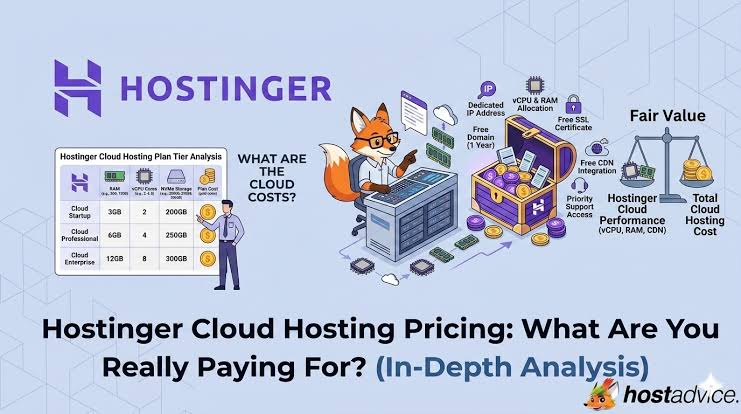
Hostinger Cloud Hosting is designed for websites that need more resources than traditional shared hosting without the complexity of managing a server yourself. The current lineup includes Cloud Startup, Cloud Professional and Cloud Enterprise, giving businesses a path to scale as their websites, stores and applications grow.
Current pricing varies by country, promotion and subscription term. Hostinger’s current US listing, for example, displays introductory monthly-equivalent pricing based on a 48-month term, with higher renewal pricing. Always check the checkout page for the exact offer available to you. Explore Cloud Hosting Plans →
Quick answer: Cloud Startup is the sensible starting point for many business and ecommerce websites. Professional adds more RAM, storage and CPU capacity, while Enterprise is aimed at substantially heavier workloads. All three are managed cloud hosting plans, so you get more infrastructure resources without having to administer a self-managed VPS.
What Is Hostinger Cloud Hosting?
Cloud hosting sits between conventional shared hosting and more hands-on server infrastructure. Instead of relying on a basic shared hosting configuration, Hostinger’s managed Cloud plans provide dedicated resource allocations such as CPU cores, RAM and NVMe storage. Visitors Web requests Managed Cloud CPU + RAM + NVMe CDN + SSL + Backups WordPress + WooCommerce Your Project Site • Store • App
A simplified view of the managed cloud hosting workflow.
Hostinger describes its Cloud plans as managed hosting, meaning server-level configuration, security and maintenance are integrated into the service. That makes cloud hosting easier to approach than a completely self-managed VPS for many website owners.
Hostinger Cloud Startup: Features and Resources
Cloud Startup is positioned as an entry point for business and ecommerce websites. According to Hostinger’s current resource documentation, the plan provides 4 CPU cores, 4 GB RAM and 100 GB NVMe storage, along with 100 PHP workers and support for up to 100 websites.
⚡
4 CPU Cores
A stronger resource allocation than basic shared hosting for websites with growing workloads.
💾
100 GB NVMe
Fast storage for website files, databases, media and applications.
🛡
Managed Environment
Designed to provide cloud resources without requiring full server administration. For cloud Startup 4 CPU cores 4 GB RAM 100 GB NVMe Website Layer WordPress WooCommerce Web Apps Included Tools CDN SSL Backups
For Cloud Startup combines allocated resources with managed website infrastructure.Check Cloud Startup →
Cloud Professional: More Resources for Growing Websites
Cloud Professional increases the available resources for projects that have outgrown Startup. Hostinger’s current documentation lists 5 CPU cores, 6 GB RAM and 200 GB NVMe storage, with 200 PHP workers. It can therefore make more sense for busier WordPress sites, larger ecommerce projects and websites that require additional processing capacity. 5 CPU cores6 GB RAM200 GB NVMe storage200 PHP workersUp to 100 websites under current limitsHigher database and PHP resource limits than Startup
The goal is not simply to buy the biggest number. Instead, choose Professional when your site’s actual traffic, database activity, plugins, ecommerce workload or application requirements justify the additional resources. Compare Cloud Plans →
Cloud Enterprise: When You Need Substantially More Capacity
Cloud Enterprise is designed for more demanding workloads. Current Hostinger documentation lists 6 CPU cores, 12 GB RAM and 300 GB NVMe storage, plus 300 PHP workers. That makes it the most powerful of these three standard Cloud tiers. Resource Scaling Startup 4 CPU • 4 GB RAM 100 GB NVMe Professional 5 CPU • 6 GB RAM 200 GB NVMe Enterprise 6 CPU • 12 GB RAM 300 GB NVMe 300 PHP workers
Moving up the Cloud range increases the resources available to demanding websites.
Enterprise may be appropriate for larger stores, high-resource WordPress installations and applications where additional CPU, memory and storage are more important than minimizing hosting cost.
What Is Included Across Hostinger Cloud Hosting?
🌐
Free Domain
Eligible Cloud subscriptions include a domain for the first year, subject to the current offer and domain extension.
🔒
SSL & CDN
SSL certificates and CDN functionality are included to support secure connections and content delivery.
📦
Backups
Current Cloud plans include daily backups, with the platform also supporting on-demand backups.
- Managed hosting for WordPress and WooCommerce
- Node.js and web application support
- Dedicated IP address
- Priority 24/7 expert support
- Free SSL certificates
- CDN included
- Domain free for one year on eligible plans
- 30-day money-back guarantee
You can review the latest Hostinger Cloud Hosting features before choosing a plan.
Cloud Startup vs Professional vs Enterprise
Best Starting Point
Cloud Startup
4 CPU • 4 GB RAM
100 GB NVMe storage
- 100 websites
- 100 PHP workers
- 2,000,000 inodes
- Ideal for business and ecommerce sites
Growing Projects
Cloud Professional
5 CPU • 6 GB RAM
200 GB NVMe storage
- 100 websites
- 200 PHP workers
- 3,000,000 inodes
- More capacity for demanding sites
High Resource
Cloud Enterprise
6 CPU • 12 GB RAM
300 GB NVMe storage
- 100 websites
- 300 PHP workers
- 4,000,000 inodes
- Better suited to heavier workloads
The current resource limits above are based on Hostinger’s published Cloud Hosting documentation. Pricing is separate: introductory rates depend on the billing term and location, and renewal rates can be higher. View Current Cloud Pricing →
Pros and Cons of Hostinger Cloud Hosting
✓ Pros
- More dedicated resources than basic shared hosting
- Managed environment reduces server administration
- NVMe storage across the Cloud range
- CDN, SSL and backups included
- Dedicated IP included
- Easy upgrade path between Cloud tiers
× Cons
- Cloud hosting costs more than entry-level shared hosting
- Introductory prices may require longer commitments
- Renewal pricing can be substantially higher
- Very specialized applications may still require a VPS
Who Should Choose Each Cloud Plan?
🚀
Choose Startup
Best for businesses, WordPress websites, smaller ecommerce stores and projects moving beyond basic shared hosting.
📈
Choose Professional
Consider it when your website needs additional memory, CPU, storage or PHP capacity as traffic and complexity increase.
🏢
Choose Enterprise
A stronger fit for resource-heavy sites, larger stores and applications that can benefit from substantially more RAM.
Cloud Hosting Is Only One Part of a Successful Website
More server resources can provide a stronger foundation, but hosting alone does not create a successful website. Professional web design, WordPress development, responsive design, speed optimization and SEO-friendly architecture all influence the final result.
UX, conversion optimization, ecommerce development, landing pages, website redesign and website migration can be equally important when turning hosting infrastructure into a useful business asset.
Web Designing Experts can help businesses combine these elements so the hosting environment, design, technical structure and conversion goals work together.
If you are planning a business or ecommerce project, you can explore Hostinger Cloud Hosting as one possible infrastructure option.
Frequently Asked Questions
What is Hostinger Cloud Hosting?
It is a managed hosting service that provides more allocated CPU, RAM and storage resources than basic web hosting while keeping server management relatively simple.
What is included in Cloud Startup?
Current limits include 4 CPU cores, 4 GB RAM, 100 GB NVMe storage and 100 PHP workers, alongside features such as SSL, CDN and backups.
What is the difference between Cloud Startup and Professional?
Professional increases the published resources to 5 CPU cores, 6 GB RAM, 200 GB NVMe storage and 200 PHP workers.
What is the difference between Professional and Enterprise?
Enterprise increases the published resources to 6 CPU cores, 12 GB RAM, 300 GB NVMe storage and 300 PHP workers.
Is Hostinger Cloud Hosting good for WordPress?
It can be a good fit for WordPress sites that need more resources than entry-level hosting, particularly growing business and ecommerce websites.
Is Hostinger Cloud Hosting worth considering in 2026?
It is worth comparing if you want managed hosting with stronger resources, CDN, SSL, backups and an upgrade path from Startup to higher Cloud tiers.
Final Verdict: Which Hostinger Cloud Plan Should You Choose?
Cloud Startup is the logical choice for many small businesses, WordPress websites and ecommerce projects that need more resources without jumping straight to a higher tier.
FOR Cloud Professional makes more sense when additional RAM, CPU, storage and PHP capacity become useful for a growing website. Cloud Enterprise is aimed at substantially heavier workloads where 12 GB of RAM and 300 GB of NVMe storage provide a more appropriate resource ceiling.
The biggest advantages are managed infrastructure, scalable resources, NVMe storage, CDN, SSL, backups and a dedicated IP. The main trade-off is cost: Cloud hosting is more expensive than basic shared hosting, and promotional pricing should not be confused with the renewal rate.
Overall, Hostinger Cloud Hosting is a practical option for businesses that have outgrown basic hosting and want a simpler alternative to managing their own server.
Pricing note: Hostinger’s displayed prices depend on location, promotion and subscription term. The monthly-equivalent figure may represent a multi-year plan paid upfront. Check the final checkout price, renewal rate and included features before purchasing.
Ready for More Powerful Hosting?
Compare Cloud Startup, Professional and Enterprise, then choose the resource level that matches your website’s traffic, applications, ecommerce requirements and expected growth. Check Cloud Hosting Plans →
You can also read: Hostinger Cloud Pricing vs Shared Hosting: Which One Should You Choose in 2026?