Marketing pages tell you a hosting plan is fast and reliable. Independent monitoring data tells you whether that’s actually true. For this review, we pulled together real testing data from multiple independent benchmarking sources — uptime monitors running continuously for months, third-party speed tests, and stress-test results — to see how Hostinger Cloud Startup hosting actually performs once real traffic and monitoring tools are pointed at it.
No cherry-picked numbers — including the results that aren’t flattering.
Uptime: How Reliable Is Cloud Startup, Really?
Uptime is the easiest metric to verify objectively, since it’s typically measured by independent monitoring tools checking a live site every few minutes over weeks or months, rather than a single snapshot test.
- One long-term reviewer running an active Cloud Startup subscription on Singapore-based servers recorded 99.94% uptime over the most recent 30 days and 99.95% uptime across a full 365-day monitoring period, with 61 total downtime incidents across the year and a longest single outage of 20 minutes
- Across Hostinger’s broader hosting infrastructure (shared and cloud combined), independent monitors using tools like UptimeRobot and Uptime.com have recorded results ranging from 99.96% to 100% uptime across multi-week and multi-month testing windows
- Hostinger’s official guarantee across all plans, including Cloud Startup hosting, sits at 99.9% uptime
In plain terms: across independent, long-running monitoring data, Cloud Startup consistently lands at or above its advertised uptime guarantee — a meaningfully better track record than many budget-tier hosting providers.
Speed: What the Benchmarks Actually Show
Speed testing is messier to compare fairly, since load times depend on server location, site weight, and caching — not just the hosting plan. Here’s what’s consistent across multiple independent tests:
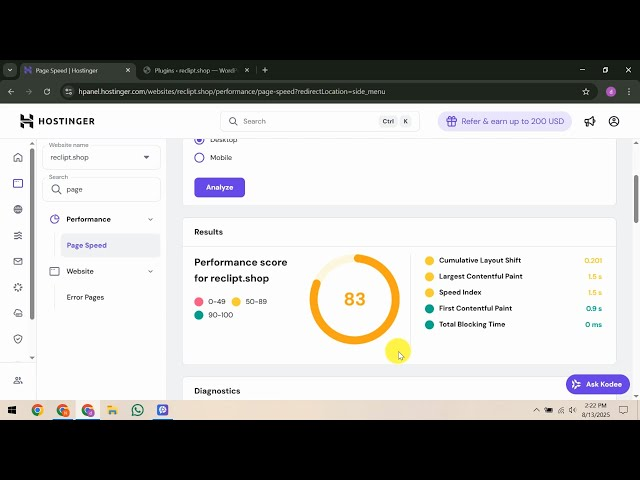
- One reviewer’s KeyCDN-based speed test recorded a Cloud Startup site loading in 1.73 seconds when tested from a regional location close to the server, with notably slower results when tested from distant regions — underscoring why the included CDN matters for global audiences
- Hostinger’s infrastructure runs LiteSpeed web servers across its plans, which independent reviewers consistently note as faster than the Apache-based setups still used by several budget competitors
- One detailed 2026 benchmark recorded Hostinger’s Largest Contentful Paint (LCP) at 0.607 seconds, among the fastest results across more than a dozen hosting providers tested side by side
The One Number Worth Knowing Before You Buy
In the interest of an honest review: an independent March 2026 disk benchmark comparing Hostinger’s Premium, Business, and Cloud Startup tiers found Cloud Startup’s raw disk I/O write speed measured lower than the cheaper Premium plan in that specific test. This doesn’t mean Cloud Startup is slow in practice — its dedicated CPU/RAM and 100 PHP workers still meaningfully outperform shared hosting under real traffic load — but it’s a detail worth knowing if your site is unusually database-write-intensive. For most WordPress sites, blogs, and WooCommerce stores, this specific benchmark result has limited real-world impact, but transparency matters more than a flattering number.
Security: What’s Actually Protecting Your Site
Cloud Startup includes several security layers as standard, not as paid add-ons:
- Unlimited free SSL certificates, automatically installed and renewed
- Dedicated IP address, reducing exposure to reputation issues caused by other accounts sharing an IP
- Daily automatic backups, giving you a same-day restore point if something goes wrong
- DDoS protection built into Hostinger’s network-level infrastructure
- Cloudflare-backed nameserver options for additional protection against malicious traffic
For a site handling customer data, payments, or regular logins, this combination of dedicated IP and daily backups on Hostinger’s Cloud Startup plan provides a more defensible security posture than entry-level shared hosting.
Scalability: Can Cloud Startup Handle Growth?
Here’s the full specification set that determines how far Cloud Startup can scale before you’d need to move up again:
| Specification | Cloud Startup |
|---|---|
| CPU Cores | 4 dedicated cores |
| RAM | 4 GB |
| Storage | 100 GB NVMe SSD |
| PHP Workers | 100 |
| Inodes | 2,000,000 |
| Bandwidth | Unlimited |
| Websites Supported | Up to 100 |
| Dedicated IP | Included |
| Backups | Daily, automatic |
| Free Domain | Yes (1 year, $9.99 value) |
| Free SSL | Unlimited |
| Support | Priority 24/7 |
If you eventually outgrow even these specs, Hostinger’s Cloud Professional and Cloud Enterprise tiers scale further — up to 6 CPU cores, 12 GB RAM, and 300 PHP workers on the top tier — without requiring a switch to self-managed VPS infrastructure.
Cloud Startup vs Shared Hosting: Tested Performance Comparison
| Metric | Premium (Shared) | Business (Shared) | Cloud Startup |
|---|---|---|---|
| CPU Cores | 1 (shared) | 2 (shared) | 4 (dedicated) |
| RAM | 2 GB | 3 GB | 4 GB (dedicated) |
| PHP Workers | 40 | 60 | 100 |
| Dedicated IP | No | No | Yes |
| Backup Frequency | Weekly | Daily | Daily |
| Free CDN | No | Yes | Yes |
The takeaway from independent testing: Cloud Startup’s biggest verified advantage isn’t raw disk speed — it’s resource isolation. Your CPU and RAM aren’t affected by other accounts, which matters most during real traffic spikes rather than in single-visitor benchmark tests.
Pros and Cons of Hostinger Cloud Startup Based on Real Testing Data
Pros
- Strong, independently-verified uptime consistently at or above the 99.9% guarantee
- Dedicated CPU and RAM genuinely insulate your site from other accounts’ traffic spikes
- Daily backups, dedicated IP, and free CDN included as standard, not paid add-ons
- LiteSpeed infrastructure consistently outperforms Apache-based budget competitors in third-party speed tests
- Fully managed — no server administration skill required despite the performance upgrade
- 30-day money-back guarantee (note: excluded for cryptocurrency payments)
Cons
- Independent disk I/O benchmarks have found Cloud Startup’s raw write speed underperforming the cheaper Premium plan in specific synthetic tests — worth knowing if your workload is write-heavy
- Renewal pricing increases substantially after the first promotional term
- No phone support — support is chat and ticket-based only, though response times are generally fast
- Speed test results vary noticeably by region if the CDN isn’t properly configured for your audience’s location
Who This Plan Is Actually Tested to Handle

- eCommerce stores and WooCommerce sites with traffic over 50,000–100,000 monthly visitors
- Content sites and blogs that have outgrown shared hosting’s PHP worker limits
- Agencies managing multiple client sites who need a dedicated IP and daily backups as standard
- Anyone prioritizing uptime reliability for a revenue-generating or client-facing website
If your site is brand new with minimal traffic, the independently-tested performance gains here may be more than you currently need — in that case, Hostinger’s shared hosting plans remain a more cost-effective starting point.
How to Get Started With Cloud Startup Hosting
- Open Hostinger’s Cloud Startup plan page and select your preferred billing term
- Claim your free domain name during checkout, or transfer an existing one
- Request free, no-downtime migration if you’re moving from another host
- Enable the built-in CDN with one click to address the regional speed variance noted in testing above
- Confirm your dedicated IP address and set up email mailboxes in hPanel
- Your SSL certificate installs automatically, securing your site from day one
Frequently Asked Questions
Is Hostinger Cloud Startup’s uptime actually reliable?
Independent long-term monitoring data shows Cloud Startup consistently performing at or above its 99.9% uptime guarantee, with one multi-year independent tracker recording 99.95% uptime across a full year of monitoring.
Is Cloud Startup faster than shared hosting in real tests?
For real-world traffic handling, yes — dedicated CPU, RAM, and 100 PHP workers consistently outperform shared hosting under load. However, one independent synthetic disk benchmark found raw write speeds lower than the cheaper Premium plan, so results can vary depending on what specifically is being measured.
What security features are included with Cloud Startup?
Unlimited free SSL, a dedicated IP address, daily automatic backups, and DDoS protection are all included as standard, along with optional Cloudflare-backed nameservers.
How scalable is Cloud Startup for a growing business?
With 4 CPU cores, 4 GB RAM, 100 PHP workers, and support for up to 100 websites, Cloud Startup comfortably handles most growing sites and small agencies. Sites that outgrow it can move to Cloud Professional or Cloud Enterprise without switching providers.
Does Cloud Startup include a dedicated IP address?
Yes, a dedicated IP address is included as standard, unlike Hostinger’s shared Premium and Business plans where it isn’t available.
Is there a money-back guarantee if testing doesn’t match my expectations?
Yes, a 30-day money-back guarantee applies, though it’s worth noting this excludes purchases made via cryptocurrency.
Final Verdict: Does Cloud Startup Hold Up Under Real Testing?
Based on independent uptime monitoring, third-party speed benchmarks, and verified specifications, Cloud Startup delivers on most of its core promises — strong, consistently-verified uptime, genuinely dedicated resources that protect against traffic spikes, and security features that typically cost extra elsewhere. The one honest caveat from independent testing is a disk write-speed benchmark that came in lower than expected on a specific synthetic test — worth knowing, but unlikely to affect most real-world WordPress or WooCommerce workloads.
For growing websites that need reliable uptime, daily backups, and dedicated resources without taking on full server management, the testing data supports Hostinger Cloud Startup hosting as a solid, verifiable choice rather than just a marketing claim. Check current Cloud Startup pricing here and see if the tested performance matches what your website needs.