Choosing the right hosting for a WooCommerce store is about much more than finding the lowest monthly price and also Hostinger Cloud Hosting for WooCommerce.
Your hosting affects website speed, checkout performance, uptime, scalability, security, and the overall shopping experience. If product pages take too long to load or your store struggles when traffic increases, potential customers may simply leave.
That is why many growing online stores consider managed cloud hosting instead of basic shared hosting.
Hostinger Cloud Hosting is currently positioned specifically for business and ecommerce websites. Its Cloud Startup plan includes 4 CPU cores, 4 GB RAM, 100 GB NVMe storage, 2 million inodes, 100 PHP workers, unlimited websites, dedicated resources, CDN, dedicated IP, daily backups, unlimited SSL, and managed hosting for WordPress and WooCommerce.
Check the latest Hostinger Cloud Hosting price before purchasing because promotional pricing and regional offers can change.
Why WooCommerce Stores Need Better Hosting
WooCommerce is powerful, but an online store is generally more resource-intensive than a basic five-page business website.
Every time a visitor browses your store, your hosting may need to process:
- Product database queries
- Images and media
- Customer sessions
- Shopping carts
- Product filters
- Search requests
- Checkout processes
- Payment integrations
- Inventory information
- WordPress plugins
- PHP requests
As your product catalog and traffic grow, the demands on your hosting environment can grow too.
This is where NVMe storage, CPU resources, RAM, PHP workers, object caching, CDN delivery, and LiteSpeed technology become important.
Explore Hostinger WooCommerce Cloud Hosting if you want a managed hosting environment designed for growing ecommerce websites.
Hostinger Cloud Pricing for WooCommerce in 2026
Hostinger’s current Pakistan Cloud Hosting page lists Cloud Startup at Rs.2,099 per month for a 48-month term, with the total paid upfront. The current published 48-month price is Rs.100,752, while the listed renewal price is Rs.5,399 per month.
The global Hostinger Cloud Hosting page currently shows Cloud Startup at $7.99 per month for a 48-month term, with a $25.99 monthly renewal price.
Because pricing varies by country, currency, billing period, taxes, and promotions, the checkout page should always be treated as the final price reference.
Current Hostinger Cloud Hosting Comparison
| Feature | Cloud Startup | Cloud Professional | Cloud Enterprise |
|---|---|---|---|
| Promotional price in Pakistan* | Rs.2,099/mo | Rs.3,099/mo | Rs.6,399/mo |
| CPU cores | 4 | 5 | 6 |
| RAM | 4 GB | 6 GB | 12 GB |
| NVMe storage | 100 GB | 200 GB | 300 GB |
| Inodes | 2 million | 3 million | 4 million |
| Websites | Unlimited | Unlimited | Unlimited |
| PHP workers | 100 | More resources | More resources |
| Dedicated IP | Yes | Yes | Yes |
| CDN | Included | Included | Included |
| SSL | Unlimited | Unlimited | Unlimited |
| Backups | Daily | Daily | Daily |
| Mailboxes | Unlimited per website, free for 1 year | Same | Same |
*Promotional pricing and availability can change. Current specifications are based on Hostinger’s published plans.
See the current Hostinger Cloud plans and select the resource level that matches your store.
What Makes Hostinger Cloud Hosting Good for WooCommerce?
1. 4 CPU Cores for Store Processing
Cloud Startup currently provides 4 CPU cores.
CPU resources matter because WooCommerce stores continuously perform processing tasks. Product searches, database queries, cart operations, Hostinger Cloud Hosting for WooCommerce, checkout requests, and dynamic page generation can all require server-side processing.
A larger CPU allocation does not automatically make every website fast, but it gives a demanding ecommerce website more processing capacity than a basic hosting environment.
For stores expecting growth, that additional headroom can be valuable.
2. 4 GB RAM
Cloud Startup includes 4 GB RAM.
RAM provides working memory for active processes. WooCommerce stores can use more memory because they often run WordPress, WooCommerce, Hostinger Cloud Hosting for WooCommerce, payment gateways, analytics, security plugins, shipping integrations, marketing tools, and other extensions simultaneously.
If your website is becoming increasingly complex, additional RAM can provide useful breathing room.
3. 100 GB NVMe SSD Storage

One of the standout specifications is 100 GB of NVMe storage.
NVMe storage is designed for high-speed data access and is particularly useful for websites that frequently read and write data.
For an ecommerce website, storage may be used for:
- Product images
- Product variations
- WordPress files
- WooCommerce data
- Databases
- Customer uploads
- Website backups
- Plugins
- Themes
- Cached resources
Hostinger currently lists 100 GB NVMe storage on Cloud Startup and increases this to 200 GB and 300 GB on the Professional and Enterprise plans.
Get fast NVMe Cloud Hosting for WooCommerce if storage and performance are priorities for your store.
Object Cache for WooCommerce and WordPress
Caching is one of the most important concepts in website performance.
Instead of repeatedly generating the same information from scratch, caching can store frequently requested data so it can be served more efficiently.
Hostinger’s current Cloud Hosting offering includes Object Cache for WordPress, alongside WordPress acceleration features. Its ecommerce hosting page specifically lists object caching and WordPress acceleration.
Why Object Cache Matters
WooCommerce websites frequently interact with databases.
For example, your store may need to retrieve:
- Product information
- Categories
- Prices
- Customer information
- Inventory
- Settings
- Orders
Object caching can reduce repeated database work for suitable requests.
That can help improve the responsiveness of dynamic WordPress and WooCommerce websites.
However, caching is not a substitute for good development.
A fast store still needs:
- Optimized images
- Lightweight themes
- Efficient plugins
- Clean database queries
- Proper caching configuration
- Mobile optimization
- Good Core Web Vitals
- Efficient JavaScript and CSS
LiteSpeed Hosting for WooCommerce Performance
Hostinger’s performance stack includes LiteSpeed technology.
LiteSpeed is a web server technology designed for high-performance web delivery, and Hostinger combines it with other optimization features such as NVMe storage, Object Cache, CDN, and WordPress acceleration.
For WooCommerce, this combination is useful because ecommerce pages are often dynamic.
A good hosting stack can reduce bottlenecks, but the website itself still needs to be professionally optimized.
If you are hiring someone to build a WooCommerce store, ask them to optimize the entire website—not simply install WooCommerce and a theme.
Start with Hostinger’s WooCommerce-optimized Cloud Hosting.

CDN Included for Faster Global Delivery
A Content Delivery Network helps deliver static website assets through a distributed network.
This can be especially useful if your ecommerce customers are located in different cities or countries.
Hostinger includes CDN functionality with its current Cloud Hosting plans.
A CDN can help with the delivery of resources such as:
- Images
- CSS
- JavaScript
- Static files
- Other cached website assets
For an online store with large product images, efficient content delivery can make a noticeable difference to the user experience.
Free Domain and Unlimited SSL
Hostinger Cloud Hosting currently includes a free domain for one year on eligible plans and unlimited free SSL.
The domain is your store’s web address, while SSL enables secure HTTPS connections.
For an ecommerce website, HTTPS is essential because customers expect a secure shopping environment.
SSL is particularly important for:
- Login pages
- Customer accounts
- Checkout
- Contact forms
- Payment-related pages
- General website security
The free domain reduces the initial launch cost, Hostinger Cloud Hosting for WooCommerce, while free SSL eliminates the need to purchase separate certificates for your websites.
Professional Email for Your Store
A professional ecommerce business should ideally communicate through its own domain.
For example:
Hostinger currently advertises unlimited mailboxes per website free for one year on Cloud Startup.
That can be useful for businesses with multiple employees or departments.
Remember that the free period is limited, so review the applicable terms before purchase.
Dedicated IP Address Included
Hostinger Cloud Hosting includes a dedicated IP address.
A dedicated IP can be useful for certain business, networking, security, and application requirements.
It also separates your hosting environment from the shared-IP arrangement commonly associated with basic shared hosting.
Hostinger specifically lists dedicated IP as a Cloud Hosting feature.
Choose Hostinger Cloud with a dedicated IP for your ecommerce project.
Daily Backups for WooCommerce
A WooCommerce store can represent months or years of work.
You may have:
- Thousands of products
- Customer accounts
- Orders
- Product descriptions
- Images
- Blog content
- Custom settings
- Marketing integrations
Losing that data can be extremely costly.
Cloud Startup currently includes daily backups, and Hostinger lists on-demand backups as part of the Cloud Startup package.
Backups can help when:
- A plugin breaks your store
- An update causes an error
- A developer makes a mistake
- A database problem occurs
- Files are accidentally removed
- You need to restore a previous version
For mission-critical ecommerce stores, maintaining an independent backup strategy is still recommended.
Hostinger Cloud vs Shared Hosting for WooCommerce
Should you simply use shared hosting?
It depends on your store.
| Requirement | Shared Hosting | Hostinger Cloud |
|---|---|---|
| Small product catalog | Good | Excellent |
| Growing WooCommerce store | May become limited | Better suited |
| CPU resources | Lower | 4+ cores |
| RAM | Lower | 4 GB+ |
| NVMe | Plan dependent | Yes |
| Object Cache | Plan dependent | Included |
| CDN | Included on current plans | Included |
| Dedicated IP | Usually not standard | Yes |
| Daily backups | Plan dependent | Yes |
| Multiple websites | Plan dependent | Unlimited |
| Ecommerce growth | Limited | Stronger |
| Managed WooCommerce | Limited/plan dependent | Yes |
For a very small store, shared hosting may be sufficient.
For a store that is already generating meaningful sales or expects significant growth, Cloud Hosting is usually the more sensible long-term environment.
Hostinger Cloud vs VPS Hosting for WooCommerce
Another option is VPS hosting.
A VPS gives you more direct control and can provide significant resources. But that flexibility comes with additional technical responsibility.
With managed Cloud Hosting, Hostinger handles much of the server-side complexity.
Managed Cloud Hosting is better if you want:
- Easier setup
- Managed WordPress
- Managed WooCommerce
- Built-in performance tools
- Support
- Automatic maintenance features
- Less server administration
VPS is better if you need:
- Root access
- Custom server configuration
- Specialized software
- Greater infrastructure control
- Advanced developer workflows
For a business owner who wants to concentrate on selling products rather than maintaining Linux servers, managed Cloud Hosting can be the easier choice.
Compare Hostinger Cloud Hosting with your current hosting setup before making the switch.
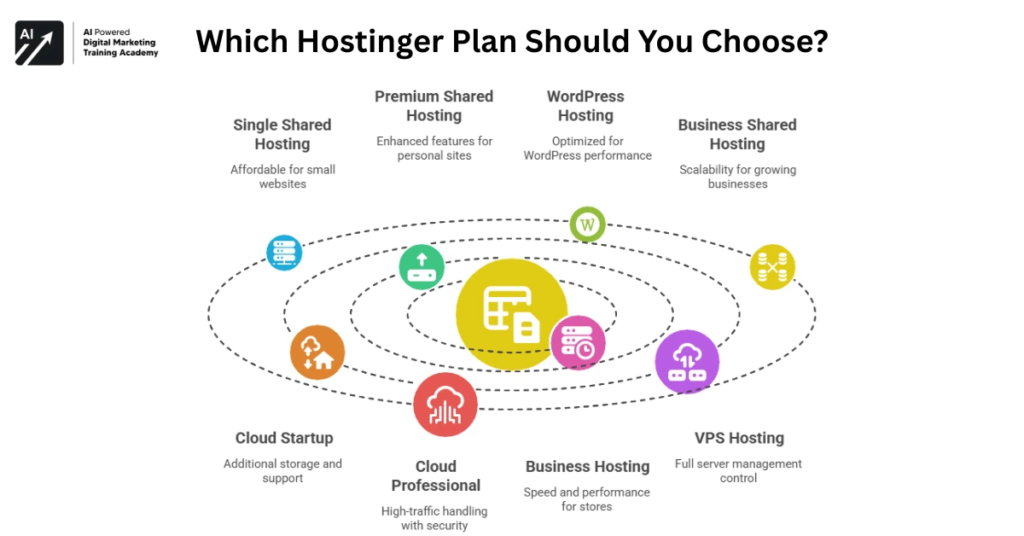
Which Hostinger Cloud Plan Should You Choose?
Cloud Startup
Cloud Startup is the logical starting point for many WooCommerce businesses.
You get:
- 4 CPU cores
- 4 GB RAM
- 100 GB NVMe
- 2 million inodes
- 100 PHP workers
- Unlimited websites
- Dedicated IP
- CDN
- Daily backups
- Object Cache
- Managed WooCommerce
- Unlimited SSL
- Free domain for one year
For a growing ecommerce website, this is a strong feature set.
Cloud Professional
Professional increases resources to:
- 5 CPU cores
- 6 GB RAM
- 200 GB NVMe
- 3 million inodes
- More PHP workers
It makes more sense when your store has larger catalogs, higher traffic, more complex integrations, or greater resource requirements.
Cloud Enterprise
Enterprise provides:
- 6 CPU cores
- 12 GB RAM
- 300 GB NVMe
- 4 million inodes
This is designed for more demanding websites and businesses that need substantial resource headroom.
View Hostinger Cloud plans for your WooCommerce store and choose based on your actual traffic and resource requirements.
Hostinger Cloud Hosting Pros and Cons
Pros
- WooCommerce-focused managed hosting
- 4 CPU cores on Cloud Startup
- 4 GB RAM
- 100 GB NVMe storage
- 2 million inodes
- 100 PHP workers
- Object Cache
- LiteSpeed-based performance stack
- CDN included
- Dedicated IP
- Unlimited SSL
- Free domain for one year
- Daily backups
- On-demand backups
- Professional email
- 24/7 priority support
- Unlimited websites
- 30-day money-back guarantee
Cons
- More expensive than basic shared hosting
- Long-term promotional pricing generally requires upfront payment
- Renewal prices are considerably higher than promotional rates
- Some advanced resources require Professional or Enterprise
- Free domain and mailbox benefits are time-limited
- A powerful server cannot compensate for poorly optimized WooCommerce development
How to Make Your WooCommerce Store Even Faster
Buying fast hosting is only one part of ecommerce performance.
To get the most from your Cloud Hosting environment, optimize the website itself.
Follow these WooCommerce performance practices:
- Compress product images
- Use WebP or modern image formats where appropriate
- Remove unnecessary plugins
- Keep WordPress and WooCommerce updated
- Use a lightweight theme
- Enable caching correctly
- Optimize your database
- Minimize unnecessary JavaScript
- Improve mobile performance
- Monitor Core Web Vitals
- Use a CDN
- Keep product pages clean and focused
A professionally designed WooCommerce store should balance speed, usability, SEO, branding, and conversions.
If your current store looks outdated or performs poorly, upgrading hosting alone may not solve the problem.
You may also need professional web design, WooCommerce development, speed optimization, and technical SEO.
Build your WooCommerce website on Hostinger Cloud and Hostinger Cloud Hosting for WooCommerce pair the hosting with professional development and optimization.
Frequently Asked Questions

Is Hostinger Cloud Hosting good for WooCommerce?
Yes. Hostinger specifically markets Cloud Startup for business and ecommerce websites and includes managed WooCommerce hosting, Object Cache, WordPress acceleration, NVMe storage, CDN, and substantial CPU and RAM resources.
How much does Hostinger Cloud Hosting cost?
Current promotional pricing depends on your region and billing term. In Pakistan, Hostinger currently lists Cloud Startup at Rs.2,099 per month for a 48-month term, Hostinger Cloud Hosting for WooCommerce paid upfront. The global page currently lists $7.99 per month for the same 48-month Cloud Startup term.
Does Hostinger Cloud include NVMe storage?
Yes. Cloud Startup currently includes 100 GB NVMe storage, while Professional includes 200 GB and Enterprise 300 GB.
Does Hostinger Cloud include Object Cache?
Yes. Hostinger’s current ecommerce and Cloud Hosting information lists Object Cache for WordPress.
Does Hostinger Cloud use LiteSpeed?
Hostinger’s Cloud Hosting performance stack includes LiteSpeed technology along with NVMe storage, CDN, Object Cache, and WordPress acceleration.
Does Hostinger Cloud include a dedicated IP?
Yes. Dedicated IP is included with the current Cloud Hosting plans.
Does Hostinger Cloud include free SSL?
Yes. Hostinger currently includes unlimited free SSL certificates with its Cloud Hosting plans.
Does Hostinger Cloud include a free domain?
Eligible Cloud Hosting plans include a free domain for one year. Domain eligibility and renewal pricing depend on the selected domain extension and current terms.
How much RAM does Cloud Startup have?
Cloud Startup currently includes 4 GB RAM. Cloud Professional has 6 GB, while Cloud Enterprise has 12 GB.
Is Cloud Hosting better than shared hosting for WooCommerce?
For a growing WooCommerce store, Cloud Hosting generally provides more resources and a stronger performance foundation. A small store with low traffic may still be perfectly comfortable on shared hosting.
Final Verdict: Is Hostinger Cloud Hosting Worth It for WooCommerce?
For a serious WooCommerce business, hosting should be viewed as part of your store’s infrastructure—not simply another monthly expense.
Hostinger Cloud Hosting currently combines 4 CPU cores, 4 GB RAM, 100 GB NVMe storage, 2 million inodes, 100 PHP workers, Object Cache, CDN, dedicated IP, unlimited SSL, daily backups, managed WooCommerce, free domain for one year, professional email, and priority 24/7 expert support on Cloud Startup.
That is a substantial package for a growing online store.
If you are launching a tiny ecommerce website, shared hosting may be enough.
But if your store is expected to generate regular sales, handle larger product catalogs, receive increasing traffic, or support more complex WooCommerce functionality, managed Cloud Hosting is the more future-focused option.
Get Hostinger Cloud Hosting for WooCommerce and check the current promotional price for your location.
And remember: fast hosting is only one piece of the puzzle.
For maximum ecommerce results, combine your hosting with professional WooCommerce web design, custom development, technical SEO, conversion optimization, speed optimization, and ongoing website maintenance.
A fast server with a poorly designed store will not magically create sales.
A well-designed, technically optimized WooCommerce store running on a capable hosting environment has a much stronger foundation for growth.
Start with Hostinger Cloud Hosting today and give your WooCommerce store the infrastructure it needs to compete, scale, and deliver a better shopping experience.
You can also read: Hostinger Cloud Pricing Review: Cloud Enterprise Features, Performance, Security & Scalability Explained.