Shared hosting built the web. For millions of websites launched over the past two decades, it was the obvious, affordable starting point. But the same architecture that made shared hosting so accessible — pooling server resources across hundreds of accounts to keep costs down — is exactly what causes the performance problems that growing websites eventually hit. This post explains precisely what changes when you move from traditional shared hosting to Hostinger Cloud Startup hosting, feature by feature, so you can decide whether that change is worth making for your website right now.
The Fundamental Problem With Traditional Shared Hosting
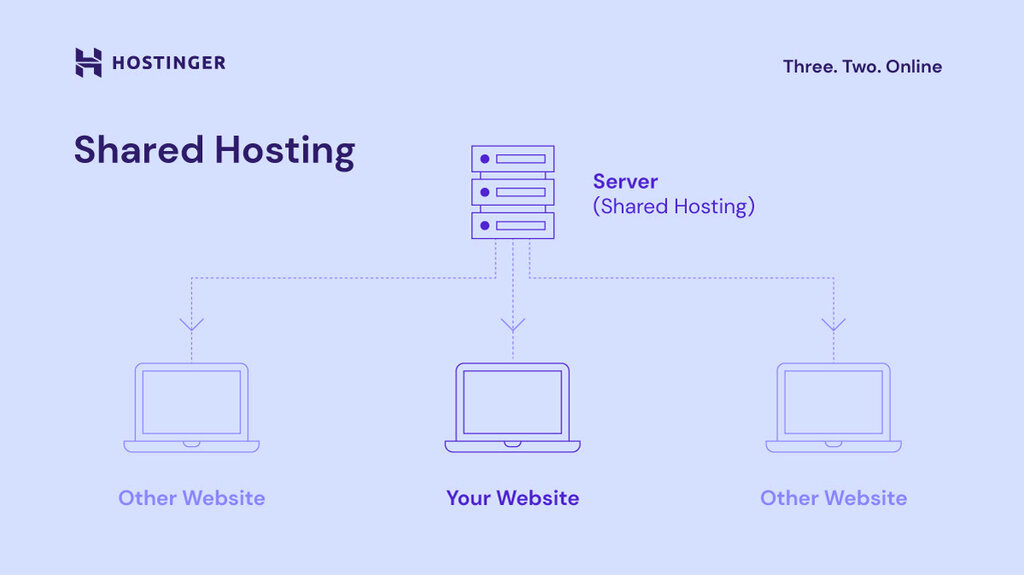
Understanding why cloud hosting outperforms shared hosting starts with understanding shared hosting’s architecture. On a shared server, your website competes for CPU, RAM, and processing capacity with every other website on that same physical machine — sometimes hundreds of them. Most of the time, this works fine. But three specific scenarios expose the weakness:
- Traffic spikes: If a neighbouring account suddenly drives massive traffic, your shared CPU allocation shrinks and your site slows down — even though it’s not your traffic causing the problem
- Resource-heavy operations: Running multiple WordPress plugins, processing WooCommerce orders, or generating dynamic content all compete for the same limited PHP worker pool on shared hosting
- Growth: As your own traffic grows month by month, you’ll eventually hit a ceiling that only a resource upgrade — or a plan change — can fix
Cloud Startup hosting addresses all three of these by changing the fundamental architecture: instead of a shared pool, you get dedicated resources no other account can touch.
Hostinger Cloud Startup vs Shared Hosting: Complete Feature Comparison
| Feature | Premium Shared | Business Shared | Cloud Startup |
|---|---|---|---|
| CPU Allocation | 1 core (shared pool) | 2 cores (shared pool) | 4 cores (dedicated) |
| RAM | 2 GB (shared) | 3 GB (shared) | 4 GB (dedicated) |
| Storage | 20 GB SSD | 50 GB NVMe | 100 GB NVMe |
| PHP Workers | 40 | 60 | 100 |
| Inodes | 400,000 | 600,000 | 2,000,000 |
| Websites | 3 | 50 | 100 |
| Backups | Weekly | Daily | Daily |
| Dedicated IP | No | No | Yes |
| Free CDN | No | Yes | Yes |
| Resource Isolation | None | None | Full isolation |
7 Specific Features That Make Cloud Startup Better Than Shared Hosting
1. Dedicated CPU and RAM — Your Resources, Always
This is the defining feature of Cloud Startup hosting. Four CPU cores and 4 GB of RAM are allocated exclusively to your account. No other website on the infrastructure can consume your allocation — not during their traffic spikes, not during their resource-intensive operations, not ever.
On shared hosting, the headline CPU and RAM figures are theoretical maximums from a shared pool. In practice, your available resources fluctuate based on what every other account on the server is doing at that moment. Cloud Startup removes that variable entirely.
2. 100 PHP Workers vs 40 on Entry-Level Shared
PHP workers determine how many simultaneous requests your site can handle before visitors start waiting in a queue. On Premium shared hosting, you have 40 workers. On Cloud Startup, you have 100 — meaning your site can serve roughly 2.5 times as many concurrent visitors before performance begins to degrade.
For a blog running a viral post, a WooCommerce store during a sale event, or a business site hit by a sudden ad campaign spike, those extra PHP workers are the difference between visitors seeing a fast, working page and a timeout error.
3. 100 GB NVMe Storage vs 20 GB Standard SSD
Cloud Startup provides five times the storage of the entry-level shared plan, using NVMe SSD technology rather than standard SSDs. NVMe operates through a faster interface that delivers meaningfully quicker read/write speeds — important for database-heavy applications like WordPress, WooCommerce catalogs, and media-rich content sites.
The 2,000,000 inode limit (vs 400,000 on Premium shared) is equally significant for large sites — inodes count your individual files and folders, so a large plugin library, theme collection, or product image set needs that headroom.
4. Daily Automatic Backups vs Weekly
Shared Premium hosting backs up your site once a week. Cloud Startup backs up daily. That means if something breaks — a plugin conflict, a security incident, an accidental database deletion — your maximum data-loss window is under 24 hours rather than up to 7 days.
For websites publishing regularly, processing customer orders, or managing member accounts, the difference between a weekly and daily restore point isn’t technical trivia — it’s the gap between losing a few hours of work and losing an entire week’s worth.
5. Dedicated IP Address Included
Shared hosting plans at Hostinger (Premium and Business) don’t include a dedicated IP address. Cloud Startup includes one as standard. This matters in two specific situations:
- Email deliverability: On shared hosting, your outgoing emails share an IP with every other account on the server. If one of those accounts sends spam, your IP reputation can suffer, affecting whether your newsletters or transactional emails land in inboxes or spam folders. A dedicated IP eliminates this shared-reputation risk
- Certain SSL and security configurations that technically require or benefit from a dedicated IP address
6. Built-In CDN With a Single Click
Cloud Startup includes Hostinger’s CDN directly in hPanel, enabled with a single click and no separate billing. The CDN caches static content across global server locations, reducing load times for visitors regardless of where they’re browsing from. Hostinger reports this can improve overall performance scores by approximately 40% for sites with geographically distributed audiences.
On Premium shared hosting, no CDN is included. On Business shared, it is included — so this specific feature is Business-level and above.
7. Host Up to 100 Websites on One Account
Premium shared hosting supports 3 websites. Business supports 50. Cloud Startup hosting supports up to 100 — each one benefiting from the same dedicated resource pool. For agencies, freelancers managing a client portfolio, or businesses running multiple brands, this is a significant consolidation advantage.
Cloud Startup Pricing: What You Pay for These Features
| Billing Term | Price Per Month | Total Upfront | Renewal Rate |
|---|---|---|---|
| 48 months | $7.99/mo | ~$383.52 | $25.99/mo |
| 24 months | ~$9.99/mo | ~$240 | $25.99/mo |
| 12 months | ~$11.99–$13.99/mo | ~$144–$168 | $25.99/mo |
Seasonal promotions frequently apply — check the current live price for Cloud Startup before checkout to see if a further discount is active.
When Shared Hosting Is Still the Right Choice
Cloud Startup isn’t the right plan for every website, and saying otherwise would be misleading. Shared hosting remains sensible when:
- You’re launching your very first website with no existing traffic
- Your site is a simple portfolio or personal blog with low visitor numbers
- Budget is the primary constraint and traffic expectations are modest
- You’re in the early testing phase of a website idea that may not continue
In these cases, Hostinger’s Premium or Business shared hosting plans are the more cost-effective starting point — you can always upgrade to Cloud Startup later as your site grows.
When Cloud Startup Is the Better Choice
- Your blog or site consistently pulls 25,000+ monthly visitors
- You’re running WooCommerce with real order volume or traffic spikes from ad campaigns
- You’ve experienced “Error Establishing Database Connection” or slowdowns during busy periods
- You need a dedicated IP for email deliverability or security reasons
- You’re an agency or freelancer managing multiple client sites under one account
- Daily backup protection matters for your data
Pros and Cons of Upgrading to Cloud Startup
Pros
- Complete resource isolation — neighbouring sites can never slow your account down
- 100 PHP workers vs 40–60 on shared plans
- 5x more NVMe storage than entry-level shared
- Daily backups, dedicated IP, and free CDN all included as standard
- Fully managed — no server administration knowledge required
- 30-day money-back guarantee
Cons
- Significantly higher price than shared hosting, especially at renewal
- Overkill for new or low-traffic websites
- No phone support — chat-based only
- Lowest rate requires 48-month upfront commitment
Frequently Asked Questions
What is the most important difference between Cloud Startup and shared hosting?
Resource isolation. On shared hosting, your CPU and RAM come from a pool shared with many other accounts. On Cloud Startup, your 4 CPU cores and 4 GB RAM are exclusively yours — no other account can affect your performance.
Is Cloud Startup hosting fully managed like shared hosting?
Yes. Despite the performance similarities to a VPS, Cloud Startup remains fully managed through Hostinger’s hPanel dashboard. No server administration or command-line knowledge is required.
Can I start on shared hosting and upgrade to Cloud Startup later?
Yes, you can upgrade through hPanel at any time, paying only the prorated difference for your remaining term. Starting on shared hosting and upgrading as your site grows is a completely valid strategy.
Does Cloud Startup include a free domain and SSL like the shared plans?
Yes. Cloud Startup includes a free domain for the first year and unlimited free SSL certificates, automatically installed and renewed — the same as shared hosting plans.
Why does shared hosting slow down during traffic spikes?
Because CPU and RAM are pooled. When your traffic spikes, you need more resources — but so might every other account on the server. Cloud Startup’s dedicated allocation means your resources are available when you need them, regardless of what’s happening on the rest of the infrastructure.
Final Verdict: Is Cloud Startup Worth the Upgrade From Shared Hosting?
For a website that’s actively growing, generating revenue, or running resource-intensive applications like WooCommerce, the upgrade from shared hosting to Hostinger Cloud Startup hosting is one of the more impactful technical improvements you can make. Dedicated CPU and RAM, 100 PHP workers, daily backups, and a dedicated IP address address the exact performance bottlenecks that shared hosting creates as traffic grows.
For a brand-new site with minimal traffic, shared hosting remains the more sensible starting point — but the upgrade path is straightforward whenever you’re ready. Check Hostinger’s current Cloud Startup pricing here and see whether the features justify the upgrade for where your website is right now.
You can also read: Hostinger Cloud Startup Price: Best Cloud Hosting for WordPress Websites and Bloggers.