If you’ve narrowed your search down to two options — Hostinger’s shared hosting plans or the Cloud Startup tier — you’re already ahead of most people shopping for hosting blind. Both are managed, both are beginner-friendly, and both come from the same provider. But the performance gap between them is bigger than the price difference suggests.
This guide breaks down exactly what separates Hostinger Cloud Startup hosting from standard shared hosting — specs, pricing, real-world performance, and which one actually fits your website right now.
The Core Difference: Shared Resources vs Dedicated Resources
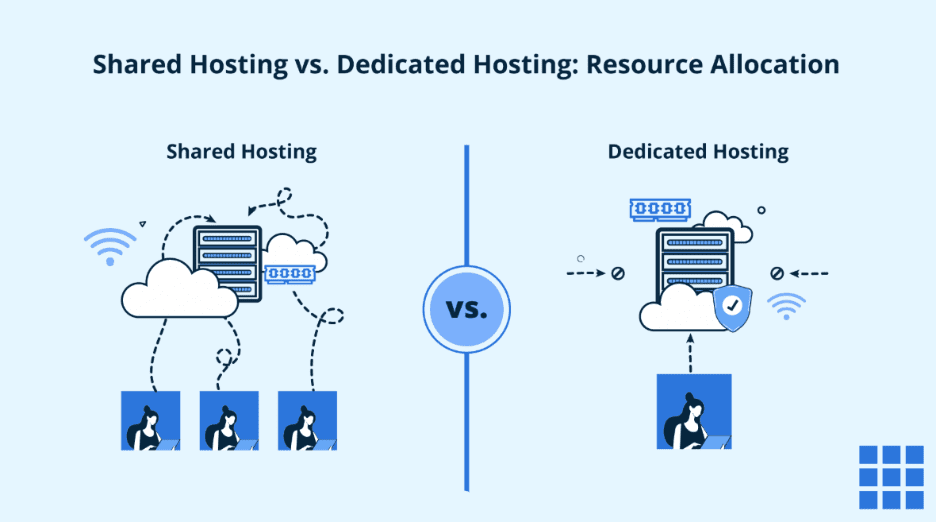
This is the one concept that explains almost every performance difference between the two hosting types.
Shared hosting (Hostinger’s Premium and Business plans) puts your website on a server alongside hundreds of other accounts. Everyone draws from the same pool of CPU, RAM, and processing power. If another site on that server gets a traffic spike, Cloud Startup vs shared hosting, your site can slow down too — even though it’s not your traffic causing the problem.
Cloud Startup hosting flips this. Your CPU cores and RAM are reserved exclusively for your account. No neighboring website can eat into your resources, no matter how busy the shared infrastructure gets. That’s why Hostinger Cloud Hosting performs more consistently under pressure than shared hosting ever can, regardless of plan tier.
Full Specification Comparison
Here’s exactly how the specs stack up across Hostinger’s three most popular plans:
| Specification | Premium (Shared) | Business (Shared) | Cloud Startup |
|---|---|---|---|
| CPU Cores | 1 core | 2 cores | 4 cores |
| RAM | 2 GB | 3 GB | 4 GB |
| Storage | 20 GB SSD | 50 GB NVMe | 100 GB NVMe |
| PHP Workers | 40 | 60 | 100 |
| Inodes | 400,000 | 600,000 | 2,000,000 |
| Mailboxes (free year 1) | 2 per website | 5 per website | 10 per website |
| Websites Hosted | Up to 3 | Up to 50 | Up to 100 |
| Dedicated IP Address | No | No | Yes |
| Backups | Weekly | Daily | Daily |
| Free CDN | No | Yes | Yes |
| Free Domain | Yes (1 year) | Yes (1 year) | Yes (1 year) |
| Free SSL | Unlimited | Unlimited | Unlimited |
The jump in PHP workers alone — from 40 on Premium to 100 on Cloud Startup — means your site can handle roughly 2.5x more simultaneous visitors before performance starts to degrade.
Pricing Comparison: What You Actually Pay
| Plan | Promo Price (48-mo term) | Renewal Rate | Best For |
|---|---|---|---|
| Premium | $2.99/mo | $10.99/mo | First websites, 0–10,000 visitors/mo |
| Business | $3.99/mo | $16.99/mo | Growing sites, up to ~50,000 visitors/mo |
| Cloud Startup | $7.99/mo | $25.99/mo | High-traffic sites, WooCommerce, agencies |
Pricing reflects standard promotional rates at the time of writing and may shift with seasonal offers. It’s worth checking the current live pricing for Cloud Startup hosting before you commit, since Hostinger frequently runs limited-time discounts on top of these rates.
Yes, Cloud Startup costs roughly double Premium’s promotional rate. But once you factor in the dedicated IP address, daily backups, free CDN, and 2.5x the PHP workers — features that would cost extra add-ons elsewhere — the price gap reflects genuinely different infrastructure, not just a marketing tier.
Real-World Performance: Where the Difference Actually Shows Up
Traffic Spikes and Database Errors
One of the most common complaints about shared hosting is the dreaded “Error Establishing Database Connection” message during traffic surges — a sale event, a viral post, or an ad campaign driving sudden visitors. This happens when shared CPU and RAM get overwhelmed. Because Cloud Startup hosting reserves dedicated resources, this specific failure point is largely eliminated.
Page Load Speed
- Premium plan (no NVMe, no CDN by default): average load times tend to sit around 2 seconds under normal conditions, but can spike under load
- Business plan (NVMe storage, free CDN included): noticeably faster, especially for image-heavy pages
- Cloud Startup (NVMe storage, free CDN, dedicated CPU/RAM): the most consistent speeds, especially during simultaneous visitor spikes
Email Deliverability
Shared hosting plans use shared IP addresses for outgoing mail, Cloud Startup vs shared hosting, which can occasionally affect deliverability if another account on the same IP gets flagged as spam. Cloud Startup’s dedicated IP address removes that risk entirely — a meaningful advantage if you’re sending transactional emails or running email marketing campaigns.
Hostinger Cloud Startup vs Shared Hosting: Side-by-Side Verdict by Use Case
| Your Situation | Recommended Plan |
|---|---|
| First-ever website, blog, or portfolio | Premium (Shared) |
| Small business site, steady but moderate traffic | Business (Shared) |
| WooCommerce store with regular sales spikes | Cloud Startup |
| Agency managing multiple client websites | Cloud Startup |
| Site that’s outgrown shared hosting (errors, slowdowns) | Cloud Startup |
| Need a dedicated IP for email or security reasons | Cloud Startup |
Pros and Cons of Each Option
Shared Hosting (Premium / Business)
Pros:
- Lower entry price, ideal for tight budgets
- Simple enough for absolute beginners
- Business tier already includes NVMe storage, daily backups, and a free CDN
Cons:
- Performance can be affected by other accounts on the same server
- No dedicated IP address
- Lower PHP worker ceiling limits simultaneous visitor capacity
Cloud Startup Hosting
Pros:
- Dedicated CPU and RAM, unaffected by other accounts
- Dedicated IP address included at no extra cost
- 100 PHP workers and 2 million inodes support much higher traffic and larger sites
- Daily backups and free CDN included as standard
- Supports up to 100 websites on one account — ideal for agencies
Cons:
- Roughly double the entry price of Premium shared hosting
- Renewal pricing increases significantly after the first term
- Overkill for a simple personal blog or single-page portfolio with minimal traffic
How to Switch or Sign Up
- If you’re starting fresh, compare Hostinger’s Cloud Startup and shared hosting plans here to see live, current pricing
- If you’re already on shared hosting and hitting performance limits, you can upgrade directly through hPanel without downtime
- Choose your billing term — longer terms unlock the lowest monthly rate
- Claim your free domain, set up your mailboxes, and enable the CDN with one click
- If migrating from another host entirely, request Hostinger’s free migration service to move your site without data loss
Frequently Asked Questions
Is Cloud Startup actually faster than shared hosting?
Yes, in real-world conditions, particularly during traffic spikes. Dedicated CPU and RAM mean your site’s performance isn’t affected by other accounts sharing the same server, which is the most common bottleneck on shared hosting plans.
How much more expensive is Cloud Startup compared to shared hosting?
On the 48-month promotional term, Cloud Startup starts at roughly $7.99/month compared to $2.99/month for Premium shared hosting — about $5 more per month for significantly more CPU power, RAM, PHP workers, and a dedicated IP address.
Do I need Cloud Startup for a small blog or portfolio site?
Usually not. If you’re expecting under 10,000 monthly visitors and don’t need a dedicated IP, the Premium shared plan is typically sufficient and more cost-effective.
Does Cloud Startup include daily backups?
Yes. Cloud Startup includes daily automatic backups, compared to weekly backups on the entry-level Premium shared plan.
Can I upgrade from shared hosting to Cloud Startup later?
Yes, Hostinger allows you to upgrade plans directly from hPanel withoutCloud Startup vs shared hosting downtime. You’ll pay the prorated difference for your remaining billing period.
Does Cloud Startup include a dedicated IP address?
Yes, a dedicated IP address is included as standard, which isn’t available on the Premium or Business shared hosting plans. This helps with email deliverability and certain SSL configurations.
Which plan is better for WooCommerce stores?
Cloud Startup is generally recommended for WooCommerce stores expecting regular traffic spikes, large product catalogs, or using resource-heavy plugins, since its dedicated resources and higher PHP worker count prevent the database connection errors common on shared hosting during sales events.
Final Verdict: Which Should You Choose?
If your website is brand new, modest in traffic, and your budget is tight, shared hosting — particularly the Premium plan — remains a perfectly capable starting point. There’s no need to overpay for resources you won’t use yet.
But if you’re already seeing consistent traffic, running a WooCommerce store, managing multiple client websites, or simply tired of performance dips caused by other accounts on a shared server, the upgrade to Hostinger Cloud Startup hosting delivers a real, measurable performance difference — not just a bigger number on a spec sheet.
The dedicated CPU, daily backups, dedicated IP, and built-in CDN make it the more future-proof choice for any site that’s outgrowing the shared hosting environment. Compare Cloud Startup’s current pricing here and see if it’s the right move for where your website is headed next.