If you’ve been Googling “best web hosting under $50,” you’ve probably noticed the same problem every beginner runs into: every hosting company claims to be the cheapest, the fastest, and the most beginner-friendly. Almost none of them actually break down what you get for your money.
This guide cuts through that noise. We’re going to walk through exactly what Hostinger web hosting includes at its entry-level price point, how it compares to the competitors people usually mention in the same breath — Bluehost, HostGator, and GoDaddy — and whether it’s actually a smart choice if you’re launching a blog, a portfolio, or a small business website on a tight budget.
No fluff, no vague “it’s great, trust me” reviews. Just the numbers, the specs, and an honest comparison so you can make a decision in the next ten minutes.
Why “Under $50 a Year” Actually Matters for New Websites
When you’re starting a new website — whether it’s a blog, a small agency site, or your first client project — your budget is usually the tightest in year one. You don’t know yet if the site will take off, so spending $150–$200 upfront on hosting alone feels risky.
That’s exactly why long-term, low-cost plans from providers like Hostinger hosting have become so popular with bloggers, freelancers, and small businesses. A hosting plan under $50 a year typically needs to include:
- A free domain name (normally a $9.99–$15 expense on its own)
- A free SSL certificate (Google penalizes sites without one)
- Enough storage and bandwidth for a growing site, not just a placeholder page
- At least a few professional email mailboxes (your-name@yourdomain.com)
- 24/7 support for when something breaks at 2 a.m.
Most “cheap” hosts skip at least two of these. Let’s look at how Hostinger’s entry-level Premium plan actually stacks up.
Hostinger Premium Hosting Plan: Full Feature Breakdown
The Hostinger Premium plan is the entry point in their shared hosting lineup, and it’s built specifically for people launching their first website — bloggers, portfolios, small business sites, and beginner web design projects.
What’s Included in the Premium Plan
- 1 CPU core and 2 GB RAM — enough for a standard content site or small business page
- 20 GB SSD storage for files, images, and your database
- 400,000 inodes (the file/folder limit most beginners never hit)
- 40 PHP workers, so your site can handle simultaneous visitors without slowing down
- Up to 10 databases, each up to 3 GB
- Free domain name for the first year
- Unlimited free SSL certificate (auto-installed, no setup needed)
- 2 mailboxes per website, free for the first year
- Unlimited bandwidth — no surprise overage charges
- Weekly automatic backups
- Free, no-downtime website migration if you’re moving from another host
- Drag-and-drop website builder with AI tools included
- 99.9% uptime guarantee
- 24/7 customer support in 8+ languages
- 30-day money-back guarantee
You can host up to 3 websites on this single plan — which is genuinely useful if you’re managing a personal site plus a couple of client or side projects.
Hostinger Premium Pricing — What You’ll Actually Pay
Like most hosting companies, Hostinger’s price per month drops the longer you commit. Here’s the real breakdown so there are no surprises at checkout:
| Billing Term | Price Per Month | Total Paid Upfront | Renewal Rate |
|---|---|---|---|
| 48 months | $2.99/mo | $143.52 | $10.99/mo |
| 24 months | ~$3.49/mo | ~$83.76 | $10.99/mo |
| 12 months | ~$3.99/mo | ~$47.88 | $10.99/mo |
Pricing reflects Hostinger’s current promotional rates at the time of writing and is subject to change. Always confirm the live price before checkout by visiting the official Hostinger pricing page, since hosting companies frequently run seasonal discounts that can push the price even lower.
Here’s the part that matters most for the “under $50” budget: even on the 12-month term, you’re getting a full year of hosting, a free domain, free SSL, and two free mailboxes for well under $50 total — and that’s before any seasonal discount is applied. If you catch a promo (which Hostinger runs often), checking the current Hostinger deal before you buy can shave the price down even further.
Hostinger vs Bluehost vs HostGator vs GoDaddy: Honest Comparison
If you’ve shopped around at all, you’ve seen these four names everywhere. Here’s how they actually compare on the features that matter most for a beginner or small business site.
| Feature | Hostinger Premium | Bluehost Basic | HostGator Hatchling | GoDaddy Economy |
|---|---|---|---|---|
| Free Domain | Yes (1 year) | Yes (1 year) | Yes (1 year) | No (separate cost) |
| Free SSL | Yes, unlimited | Yes | Yes | Yes |
| Storage | 20 GB SSD | 10 GB SSD | Unmetered (shared limits apply) | 25 GB |
| Free Email Mailboxes | 2 included | Not included on base tier | Not included on base tier | 1 included (limited time) |
| Backups | Weekly, automatic | Paid add-on | Paid add-on | Paid add-on |
| Free Site Migration | Yes, unlimited | Limited / paid | Limited | Not standard |
| Control Panel | hPanel (custom, beginner-friendly) | cPanel | cPanel | Custom panel |
| Money-Back Guarantee | 30 days | 30 days | 45 days | Varies |
The pattern that stands out: Hostinger bundles things that competitors often charge extra for — daily-of-the-week backups, unlimited free migration, and multiple mailboxes — directly into the entry-level plan. If you want to see the live comparison and current pricing for yourself, explore Hostinger’s plans here before committing to anything else.
Why Web Designers and Developers Tend to Prefer Hostinger
If you’re a freelance web designer, agency, or developer reading this — not just someone building their first personal blog — a few specifics matter more to you than they do to a casual blogger:
- hPanel is faster to navigate than legacy cPanel layouts when you’re managing multiple client sites
- Free unlimited migrations mean you can move client sites over from other hosts without billing them extra setup fees
- Up to 3 websites on Premium (and far more on Business/Cloud tiers) means you’re not paying per-client for hosting on lower-traffic sites
- NVMe storage on higher tiers gives noticeably faster load times, which directly affects your clients’ Core Web Vitals and SEO rankings
For agencies managing several client websites, it’s worth comparing the Hostinger Business and Cloud Startup plans, which scale up to 50 and 100 websites respectively with dedicated resources, daily backups, and free CDN included.
Performance: Does Hostinger Actually Load Fast?
Pricing and features mean nothing if your site loads slowly — Google’s Core Web Vitals directly affect your search rankings, and visitors abandon slow sites within seconds.
Here’s what affects real-world speed on Hostinger:
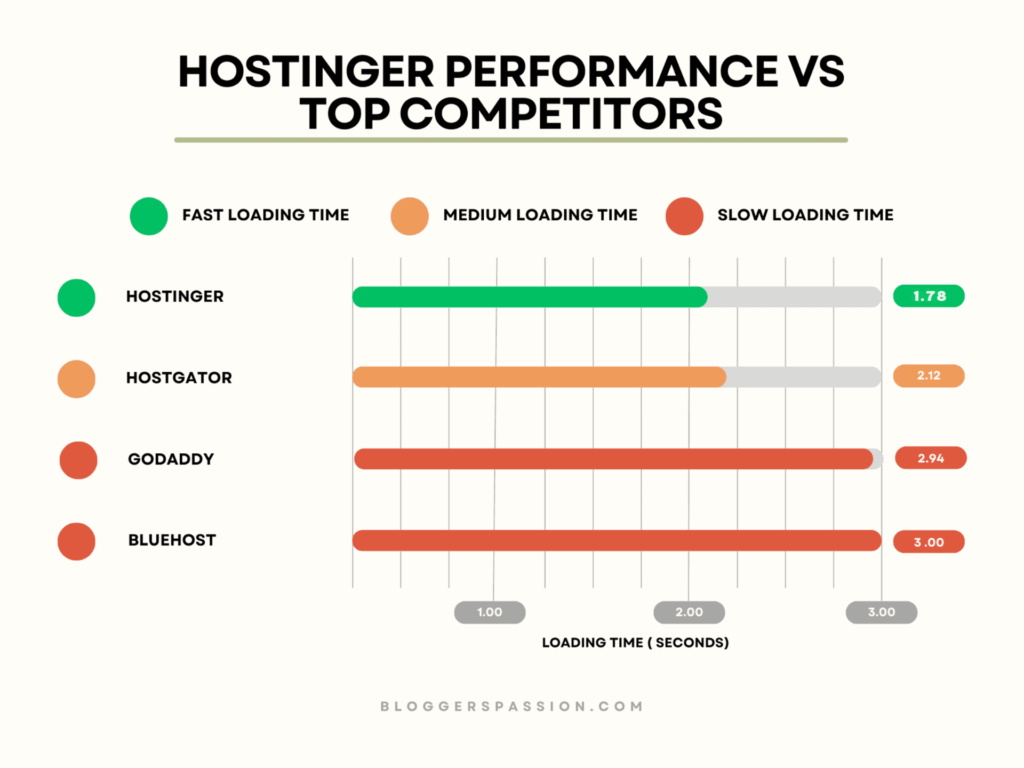
- LiteSpeed web servers, which are significantly faster than the standard Apache setup many budget hosts still use
- NVMe SSD storage on Business and Cloud Startup tiers — up to 6x faster than traditional SATA SSDs
- Built-in CDN on higher-tier plans, reducing load times for visitors regardless of their location
- 99.9% uptime guarantee, backed by real infrastructure monitoring rather than just a marketing claim
For a basic blog or portfolio, the Premium plan’s 1 CPU core and 2 GB RAM are genuinely sufficient. If you’re running WooCommerce, a membership site, or expect rapid growth, it’s worth starting one tier up — you can compare exact specs and pick the right Hostinger plan for your traffic level here.
Pros and Cons of Hostinger Hosting
Pros
- Genuinely low entry price for a full-featured plan (domain + SSL + email + backups bundled in)
- Beginner-friendly hPanel dashboard with one-click WordPress installs
- Free, hassle-free website migration if you’re switching hosts
- Strong uptime track record and LiteSpeed-powered performance
- 30-day money-back guarantee, so there’s no real risk in testing it
- 24/7 live chat support that responds quickly
Cons
- Renewal pricing is noticeably higher than the first-term promotional rate (true of nearly every major host, but worth budgeting for)
- Lowest monthly rates require longer commitments (24–48 months) paid upfront
- No phone support — support is chat-based only
- Entry-level Premium plan has shared CPU/RAM limits, so very high-traffic sites will need to upgrade eventually
None of these cons are dealbreakers for the audience this plan is built for — new websites, blogs, portfolios, and small business sites. They’re simply things to plan around, the same way you would with any hosting provider.
Who Should Choose Hostinger’s Premium Plan?
This plan makes the most sense if you fall into one of these categories:
- First-time bloggers who want a real domain, real email, and real backups without overpaying
- Small business owners setting up a simple brochure-style website
- Freelancers and students building a portfolio site to showcase work
- Web design clients on a budget who need something reliable without enterprise pricing
If you’re running an online store, a high-traffic publication, or a SaaS product, the Business or Cloud Startup tiers — both still very affordably priced — will serve you better with daily backups, more PHP workers, and dedicated resources. You can compare all current Hostinger hosting plans side by side to see which tier matches your traffic and storage needs.
How to Get Started With Hostinger in Under 10 Minutes
- Open the Hostinger plans page and choose the Premium plan (or Business if you need more headroom)
- Pick your billing term — the 12-month plan keeps you comfortably under the $50 budget; 24 or 48 months lowers your monthly cost further
- Claim your free domain name during checkout
- Use the one-click WordPress installer or the drag-and-drop builder to set up your site
- Set up your free email mailboxes under your new domain
- Launch — your SSL certificate is installed automatically, so your site is secure from day one
That’s genuinely the entire process. There’s no server configuration knowledge required, which is exactly why this plan works well for non-technical business owners and bloggers.
Frequently Asked Questions
Is Hostinger good for beginners with no technical experience?
Yes. The hPanel dashboard is built specifically to simplify tasks that used to require technical knowledge — one-click WordPress installs, automatic SSL setup, and a drag-and-drop site builder mean you don’t need any coding background to launch a working website.
Does Hostinger really include a free domain and SSL certificate?
Yes, on annual and longer-term plans, Hostinger includes a free domain for the first year and an unlimited free SSL certificate for the life of your hosting plan, automatically installed at signup.
How many email accounts do I get with the Premium plan?
The Premium plan includes 2 free mailboxes per website for the first year. Higher tiers like Business and Cloud Startup include 5 and 10 mailboxes per website respectively.
What happens to the price after the first term ends?
Like most hosting companies, Hostinger’s promotional first-term pricing increases at renewal. It’s worth setting a reminder before your term ends so you can evaluate whether to renew, switch tiers, or look for a current promotional rate.
Can I host more than one website on a single Hostinger plan?
Yes. The Premium plan supports up to 3 websites, Business supports up to 50, and Cloud Startup supports up to 100 — useful if you’re managing personal projects or multiple small client sites.
Is Hostinger better than Bluehost or HostGator for a first website?
For most beginners, Hostinger offers a stronger combination of price and included features — particularly free email mailboxes and automatic backups, which competitors often charge extra for on entry-level plans. That said, the “best” choice always depends on your specific traffic expectations and technical comfort level.
Is there a risk-free way to try Hostinger?
Yes. Hostinger backs every hosting plan with a 30-day money-back guarantee, so you can test the platform, dashboard, and support quality before fully committing.
Final Verdict: Is Hostinger Worth It Under a $50 Budget?
If your goal is to launch a real, professional website — complete with your own domain, working email addresses, SSL security, and reliable uptime — without blowing past a $50 budget, Hostinger’s Premium plan checks every box. It’s not the flashiest option on the market, but it’s consistently one of the most complete entry-level packages available once you account for everything bundled in.
For freelancers, small business owners, and anyone building their first website, that combination of price and included features is hard to beat. If you’ve read this far, you already know more about what you’re paying for than most people do before they buy hosting — so take the next step and lock in Hostinger’s current Premium hosting rate while the promotional pricing is still active.