When your website outgrows shared hosting, two options tend to come up in the same conversation: cloud hosting and VPS. Both offer dedicated resources. Both outperform shared hosting under real traffic load. But they’re built on fundamentally different assumptions about who’s managing the infrastructure — and for a growing business, cloud hosting vs VPS, that distinction matters more than the specs on paper. This review compares Hostinger Cloud Professional hosting directly against Hostinger’s VPS plans: what each delivers, what each requires from you, and which one fits a growing business better.
The Core Difference: Managed vs Self-Managed
Before comparing specs or pricing, understanding this distinction makes every other decision easier. Hostinger’s own positioning is explicit: cloud hosting sits in the middle — more resources than shared hosting, less control than VPS. The practical meaning:
- Cloud Professional: Fully managed. Server configuration, security patches, software updates, and infrastructure maintenance are handled by Hostinger. You manage your website through hPanel. No server administration knowledge required.
- VPS hosting: Self-managed. You get root access and full server control, but you’re responsible for configuring software, applying security patches, cloud hosting vs VPS, managing firewall rules, and maintaining the server environment. Technical knowledge is either required or must be hired.
For a growing business where the owner or team isn’t a server administrator, cloud hosting vs VPS, this difference alone often settles the question. Cloud Professional hosting lets you focus on running the business; VPS hosting requires someone to run the server.
Specifications Compared
| Feature | Cloud Professional | VPS KVM 1 | VPS KVM 2 |
|---|---|---|---|
| CPU Cores | 4 dedicated cores | 1–2 vCPU | 2 vCPU |
| RAM | 6 GB dedicated | 4 GB | 8 GB |
| Storage | 200 GB NVMe | 50–100 GB NVMe | 100–200 GB NVMe |
| Starting Price | $15.99/mo (48-mo term) | ~$4.99–$5.84/mo | ~$8.99/mo |
| Management Level | Fully managed | Self-managed | Self-managed |
| Free Domain | Yes (1 year) | No | No |
| Free SSL | Unlimited, included | Manual setup required | Manual setup required |
| Free CDN | Yes, built-in | Not included | Not included |
| Dedicated IP | Included | Included | Included |
| Daily Backups | Daily + on-demand | Weekly automated | Weekly automated |
| Control Panel | hPanel (no admin skills needed) | Root access / SSH | Root access / SSH |
| Staging Environment | Included | Manual setup | Manual setup |
VPS pricing reflects current promotional rates from verified sources (May 2026). Always confirm current pricing before purchase.
Pricing: Why the Numbers Aren’t as Simple as They Look
On the surface, VPS hosting appears significantly cheaper. Hostinger’s KVM 1 starts at around $4.99/month — about a third of Cloud Professional’s $15.99/month. But that comparison omits several costs and considerations:
What VPS Costs That Cloud Professional Bundles Free
- SSL certificates: On VPS, you configure these manually. Commercial SSL adds $10–$70/year per domain, or you configure Let’s Encrypt yourself
- CDN: Not included on VPS — third-party CDN services like Cloudflare Pro add $5–$20/month
- Control panel: Plesk and similar panels cost an additional $5–$15/month. Free panels require self-configuration
- Server management time: If a business owner or developer is spending hours monthly on server administration, that time has a real cost
- Security management: Firewalls, security updates, and monitoring either cost money as a service or cost time as a DIY task
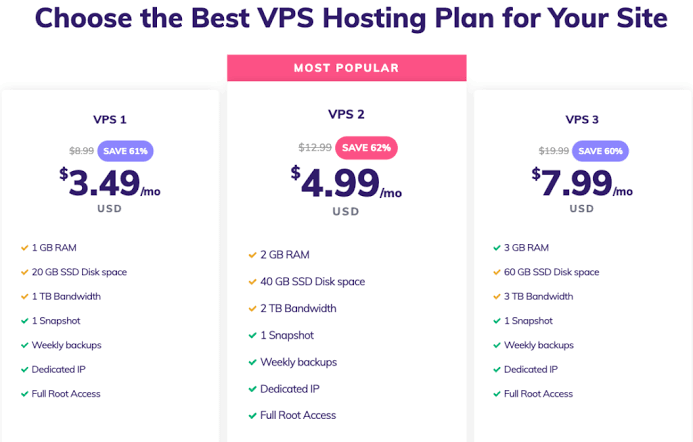
When total cost of ownership is calculated properly — including bundled SSL, CDN, and management overhead — the price gap between VPS and Cloud Professional hosting narrows considerably for most businesses.
Performance: Where Each Option Wins
Cloud Professional Performance Strengths
- Optimised stack out of the box: LiteSpeed servers, Object Cache, and the built-in CDN are pre-configured — no manual tuning required to get optimal WordPress or WooCommerce performance
- Consistent managed environment: Software versions, caching, and security configurations are maintained by Hostinger’s team, cloud hosting vs VPS, so performance doesn’t degrade from neglected updates
- CDN-accelerated delivery: Built-in CDN improves load times globally without additional configuration
VPS Performance Strengths
- Greater raw flexibility: You can configure specific PHP versions, install custom software stacks, run Redis or Memcached, and optimise the server precisely for your application’s requirements
- More RAM per dollar: VPS KVM 2 at around $8.99/month offers 8 GB RAM — more than Cloud Professional’s 6 GB at a lower price point, if you have the technical skills to use it effectively
- Full root access: For developers building custom applications, running multiple services, or needing specific server configurations, VPS provides control that managed cloud hosting can’t match
Which Is Better for a Growing Business?
The honest answer depends on one question more than any other: does your business have someone with server administration skills on hand?
| Situation | Better Choice |
|---|---|
| No in-house technical staff, or staff focused on business not servers | Cloud Professional |
| WooCommerce store approaching 1,000 products, needing reliability | Cloud Professional |
| Agency managing multiple client sites needing staging and daily backups | Cloud Professional |
| Developer needing custom server software or specific PHP configurations | VPS KVM 2 |
| Technical team who can self-manage and wants maximum resources per dollar | VPS KVM 2 |
| Business running custom applications beyond standard CMS platforms | VPS |
Cloud Professional Advantages for Business Use
- Daily backups with on-demand snapshots — VPS includes only weekly automated backups, significantly weaker protection for a business site with daily transaction data
- WordPress staging environment included — testing updates on VPS requires manually setting up a staging environment, which takes time and technical knowledge
- One-click WordPress and WooCommerce setup — no server configuration before the site is live
- Free CDN, SSL, and dedicated IP bundled — on VPS, these are either manual configuration tasks or additional costs
- Priority 24/7 expert support — Hostinger’s support handles server-side issues; on VPS, many server-side problems are your responsibility to diagnose and resolve
VPS Advantages Worth Acknowledging
- Lower base price for raw specs — more RAM per dollar if you’re technically equipped to manage the environment
- Full root access and server control — install any software, configure any stack, run any service
- Better renewal rate predictability — VPS renewal increases are significantly more moderate than shared or cloud hosting promotional-to-renewal jumps
- Scales to much higher specifications — Hostinger VPS goes up to 8 vCPU and 32 GB RAM for high-demand applications
Pros and Cons Summary: Cloud Professional vs VPS
Cloud Professional
Pros: Fully managed, daily backups with on-demand capability, staging environment, built-in CDN and SSL, WooCommerce optimised, no server skills required.
Cons: Higher monthly cost than equivalent VPS specs, less root-level control, renewal pricing jumps after promotional term.
VPS Hosting
Pros: More RAM per dollar, full root access, custom software stacks, more predictable renewal pricing, scales to very high specifications.
Cons: Self-managed (server skills required), weekly-only automated backups, no included CDN or control panel, SSL requires manual configuration.
Frequently Asked Questions
Can I run WordPress on Hostinger VPS without technical knowledge?
It’s challenging without technical experience. Hostinger does offer AI tools and setup guides for VPS, and panel options like Plesk can simplify WordPress management — but the setup process is significantly more involved than Cloud Professional’s one-click installation.
Does Cloud Professional include daily backups while VPS doesn’t?
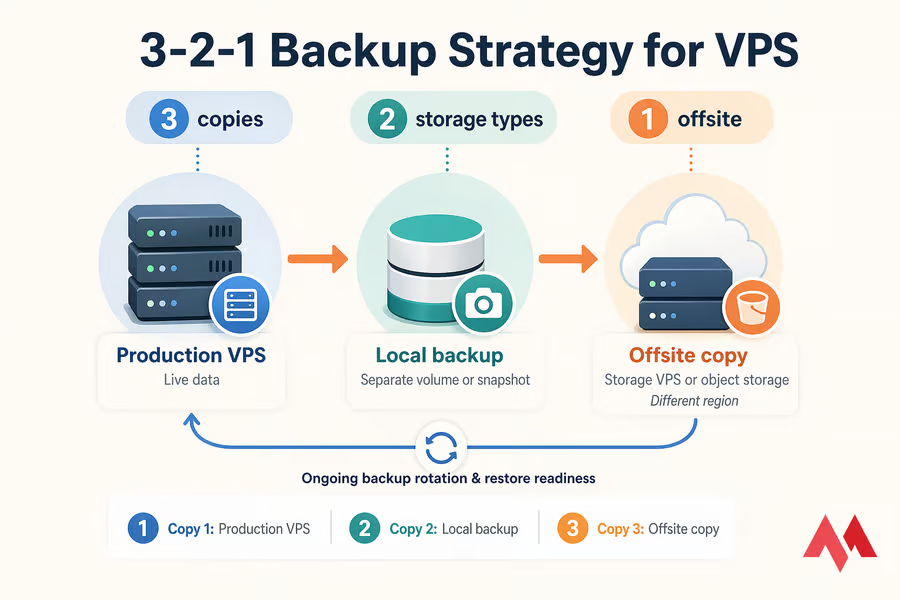
Yes. Cloud Professional includes daily automatic backups plus on-demand backup capability. Hostinger VPS includes weekly automated backups and free real-time snapshots, but daily automated backups are not a standard VPS inclusion.
Is VPS hosting genuinely cheaper than Cloud Professional?
The base monthly rate is lower, but when you account for the cost of a control panel, SSL management, CDN service, and the time spent on server administration, the total cost of ownership is often comparable — or higher for businesses without in-house technical staff.
Which has better uptime — Cloud Professional or VPS?
Both carry Hostinger’s 99.9% uptime guarantee. Cloud Professional’s managed environment means server-side issues are handled by Hostinger; on VPS, uptime can be affected by misconfiguration or neglected maintenance that’s the user’s responsibility.
Can I upgrade from Cloud Professional to VPS later?
They’re different product lines at Hostinger, so moving between them involves migrating your site rather than a simple plan upgrade. Both support free migration assistance.
Final Verdict: Cloud Professional or VPS for Growing Businesses?
For most growing businesses — those focused on building their business rather than managing server infrastructure — Hostinger Cloud Professional hosting is the stronger choice. The daily backups, staging environment, built-in CDN, and fully managed environment address the operational risks that matter most to a revenue-generating site, without requiring technical staff or server administration knowledge.
VPS is the right choice when your business has technical expertise in-house, cloud hosting vs VPS, needs custom server configurations, or is running applications that require root-level control. For that specific profile, the flexibility and lower raw spec cost make VPS genuinely compelling.
If you’re not sure which side of that line you fall on, the answer is almost always Cloud Professional — the managed infrastructure lets your business grow without infrastructure becoming a distraction. Check Hostinger’s current Cloud Professional pricing here and compare it against the full cost of self-managing a VPS before you decide.
You can also read: Hostinger Cloud Startup Hosting Features: Why It Is Better Than Traditional Shared Hosting.